









 ChatGPT
 Claude
 Grok
Grok
 Perplexity
 Gemini
Why virtual cards fit business travel
A trip has the same shape as a contract job: a start, a ceiling, and an end. Virtual cards have that shape too. You set the daily cap before the traveler leaves, the card runs the trip, and when they get home you have a finished list of charges already sorted by trip. Nobody is hunting through a paper folder of receipts a month later.
The other thing it solves is the corporate card problem. One shared card for the whole team turns into a security headache the first time a hotel keeps a copy at check-in. Per-trip virtual cards mean a lost card or a hotel data breach affects one trip, not your whole travel program.
Three things stop happening the day you switch:
- Long expense reports. The transaction list lands in your dashboard as charges clear. The trip ends and the report is mostly written.
- Hotel holds that ruin a month. A $1,500 incidentals hold on a real corporate card freezes that limit for a week. On a per-trip card it freezes only that card's cap.
- Personal spend creeping in. A card that only works during the trip dates, with a daily cap matching the per-diem, narrows the room for accidental personal charges.
What a virtual travel card actually is
A virtual travel card is a real Visa with a 16-digit number, expiry, and CVV. The difference from the card in your wallet is that you create it for one trip and set its boundaries before it ships. Once you push it to Apple Wallet or Google Wallet, the traveler taps to pay anywhere Visa is accepted, just like a normal card.
The boundaries matter. A typical setup: a trip card with a $2,500 cap, a $400 daily limit, and dates that match the itinerary. The hotel deposit, the flights, the cabs, and the meals all charge against the same card. If anything else tries (a parking ticket sent six weeks later, a hotel re-bill for damages you didn't cause), the cap or the date window blocks it.
One trip, one card, one cap. Set the cap to the trip budget. Set a daily limit close to your per-diem. Push it to the traveler's mobile wallet. When they get home, the card has done the expense report for you.
How to put a business trip on a virtual card in four steps
This is the full workflow. After the first card, every trip card after that is much faster to issue.
-
Pre-approve the trip budget.
Write down a single trip total: flights plus hotel plus a per-diem times the number of nights, plus a small buffer for cabs and meals on travel days. This is the cap. The traveler doesn't need to negotiate this with finance after the fact.
-
Issue one virtual Visa for the trip.
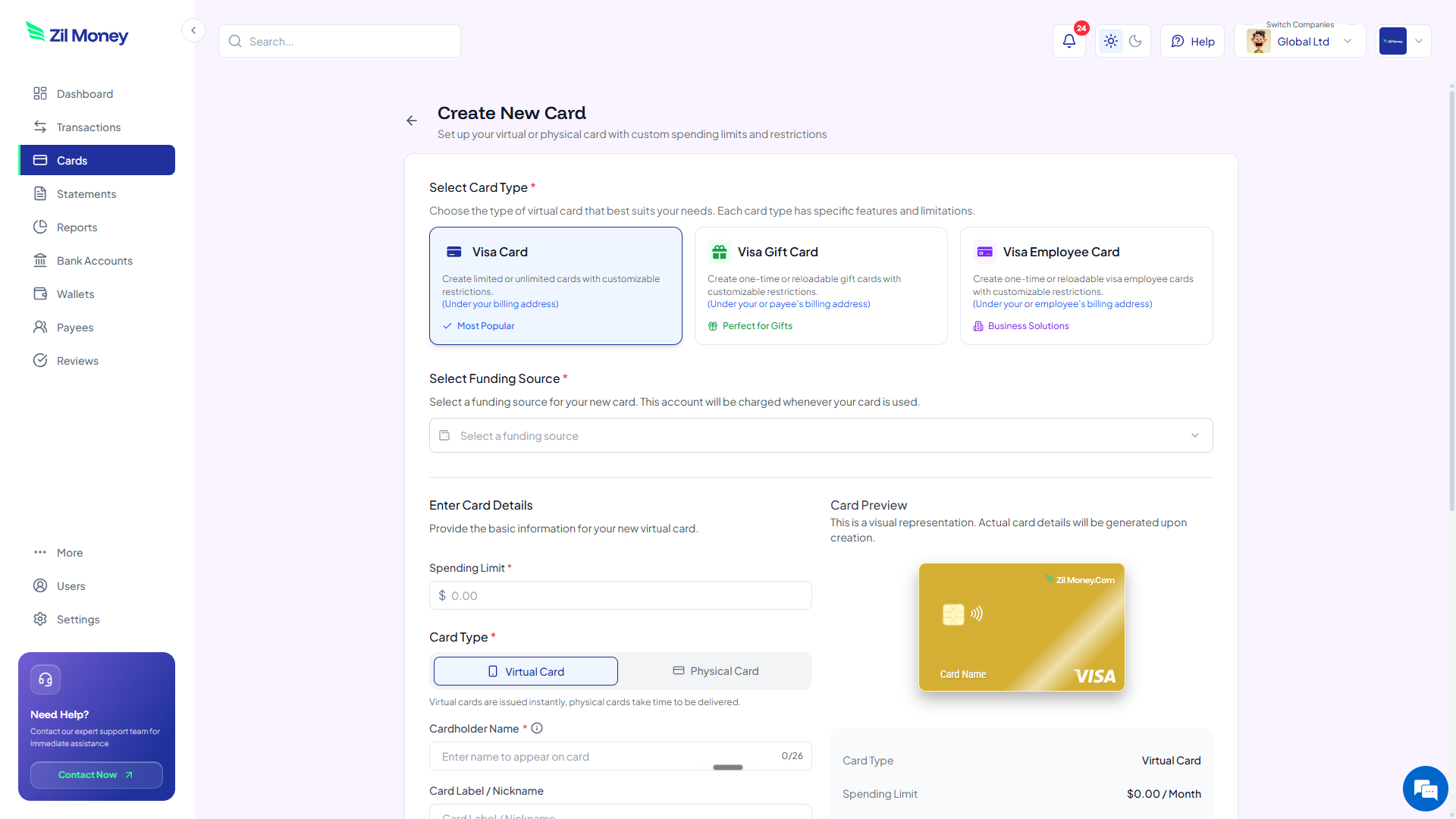
Name the card after the trip (“Conference Mar 14-18 - L. Patel” reads better than “Trip 47”). Set the total cap, set a daily limit matched to per-diem, and pick the trip dates. The card is live straight away.
-
Push the card to the traveler's mobile wallet.
Share the card details so the traveler can add it to Apple Wallet or Google Wallet on their phone. They tap to pay at the airport, the hotel, the cab, and the restaurant. The card never has to be read out loud or pasted into a checkout form.
-
Close the card on landing day.
The moment the trip ends, close the card. Any unused budget returns to your wallet. The per-trip transaction history sits in your dashboard, ready to export for the accountant.
Have a trip coming up this month?
Sign-up is quick. Your first trip card can be issued directly from the dashboard.
Trip-day reality: virtual cards vs the old way
The point of switching isn't to surveil travelers. It is to cut the time finance spends per trip from hours to minutes, while making the trip easier to take. Here's the side-by-side.
Personal card, shoebox of receipts, three-week reimbursement.
- The traveler pays out of pocket and waits weeks to be reimbursed.
- Or they share one corporate card across everyone and pray it doesn't leak.
- Hotel holds tie up the company card for a week.
- Expense report uses a spreadsheet, a PDF tool, and three meetings.
- Finance reconciles statements line by line a month later.
Per-trip Visa with a daily cap. No reimbursement queue.
- No personal money goes out the door. Nobody is waiting on payroll for a trip they took.
- If a card is compromised, the exposure ends at the trip cap.
- Holds only freeze that card. The rest of your travel program is unaffected.
- The transaction list is the expense report. Receipts go on top as attachments.
- Reconciliation happens at trip-end, not month-end.
Three travel moments where per-trip cards pay off
Travel pain is rarely about the trip itself. It's about everything around it. Here are three small ones a per-trip card removes.
The conference card a hotel kept on file
An employee attends a four-day conference. The hotel keeps the card on file for incidentals. Two weeks later, a $190 mini-bar restock charge appears (turns out a different room's tab posted to the wrong stay). On a corporate card, this becomes a 45-minute dispute. On a closed trip card, the charge fails, and the hotel sorts the room mix-up with their own back office.
The traveler whose flight got canceled at midnight
A flight cancels at 11 p.m. They need a hotel room and a new flight, now. With a per-trip card already in the mobile wallet, they book both at the airport on the spot. Finance sees the spend land in the dashboard the next morning, inside the original trip cap, with hotel name and amount already labeled.
The cross-functional offsite with eight travelers
Eight people from four teams meet for a planning offsite. Instead of routing every flight and hotel through one travel manager, each person gets their own virtual trip card for the dates. When the offsite ends, finance pulls one report per person and one rolled-up report by team. The cost-center tagging is automatic.
Travel cards and IRS accountable-plan rules
Switching to virtual cards doesn't change the rules. Business travel is non-taxable to the employee only if the company follows an accountable plan, which still requires a business connection for the spend, a substantiated record of each expense (date, amount, place, purpose), and prompt return of any unused advance. Virtual cards make all three easier.
The per-trip card naturally creates the substantiation record: the transaction list is the date and amount, and the merchant name often supplies the place. You still need to attach itemized receipts for hotels and meals so the file is complete. For unused advance, since you fund the card from your wallet, nothing was actually advanced to the employee. Cancellation returns the unused balance directly. There's no “the traveler owes us $238 from October” line item.
Why travelers actually prefer per-trip cards
A worry teams have is that travelers will resent the controls. In practice the opposite happens. Travelers don't love spending their own money waiting for reimbursement, and they don't love the message that arrives a week later: “what was this $84 charge at the rideshare app on Tuesday?”
A per-trip card with a clear cap lets them just take the trip. They tap to pay. They don't carry receipts in a wallet. They don't have to remember which card was the company one. When they land, they're done.
Put your next trip on a virtual card this afternoon
If you have a trip on the calendar this month, here is the simplest path.
- Sign up. Create an account at Virtual Card Maker. Sign-up is quick.
- Add funds. Load the trip total plus a small buffer. You don't have to prefund the whole quarter.
- Issue the card. Name it after the trip and traveler. Set the trip cap, the daily limit, and the trip dates.
- Share with the traveler. Send the card details so they can add it to Apple or Google Wallet before they leave.
- Close on landing day. Cancel the card when the trip ends. Pull the per-trip report for the accountant.
That's the loop. One trip, one card, one cap. Most teams move their next planned trip onto a virtual card and never look back.
