Issue virtual Visa cards quickly. Sign up →
Use case · Business travel

Virtual cards for business travel

Give every trip its own virtual Visa card. Set a daily limit. Pick the kinds of stores the card works at. The card ends when the trip ends. No more expense reports.

Issue quickly Apple & Google Wallet Bulk via Excel or API

Virtual Card Maker - Powered by Zil Money. Zil Money is a financial technology company, not a bank. Banking services are provided by our partner bank, Member FDIC. FDIC insurance applies only to eligible products with funds held at the partner bank, subject to applicable limits and requirements.

PCI DSS aligned
ISO 9001 Quality Management Certified
ISO 20000 IT Service Management Certified
ISO 27001 Information Security Management Certified
Aligned with NIST SP 800-53 controls
AICPA SOC for Service Organizations
AICPA SOC Service Organization Control Reports
A business traveler in an airport holding a gold Zil Money.Com Visa travel card and a phone
In short

What is a virtual card for business travel?

A virtual card for business travel is a digital Visa card you issue for a single trip or traveler. The company owns and funds it, sees every charge in one dashboard, and closes it when the trip ends.

One card per trip

Issue a dedicated card for a single trip or traveler, instead of sharing one company number.

Controls built in

Set a daily spending limit and an end date that matches the trip, so spend stays inside policy.

Tap and track

Add it to Apple Wallet or Google Wallet, tap to pay, and watch every charge land in one dashboard.

The problem

The old way is broken.

Most teams pay for travel one of three ways. All three have problems.

  • Personal card, then refund. Your team pays out of pocket and waits weeks for the money back.
  • One shared travel card. Every traveler uses the same number. Lose it and you lose every trip.
  • Cash. Easy to give, hard to track. You never know if it was spent on the trip.
How we fix it

One trip. One card.

Give each trip its own virtual Visa card. The company owns it. The card ends when the trip ends.

  • Daily spending limit. The card can be set with a daily spending limit, and transactions over that limit are declined based on your controls.
  • Card ends with the trip. Active on travel days only. Extend the card window if you expect hotel incidentals or other charges to post after return.
  • Only works at travel stores. Hotels, restaurants, taxis, gas. Block everything else.
  • Apple Wallet and Google Wallet ready. Push to phone. Tap to pay anywhere.
  • Works alongside other use cases. Same wallet can fund contractor payments, department spending, and more.
How it works

Four steps from booking to tap-ready card.

  1. Make a trip card. Name the card after the trip. Pick the traveler. Set the budget.
  2. Set the daily limit and trip dates. Use the daily cap from your travel policy. Pick the start and end dates of the trip.
  3. Send it to the traveler. They add the card to Apple Wallet or Google Wallet before they leave for the airport.
  4. Watch and close. Every charge shows up in your dashboard. The day after the trip, the card ends. Any leftover money comes back to your wallet.
Every kind of travel

Built for every kind of business travel.

Whatever the trip looks like, the trip card is shaped to fit it.

See it in action

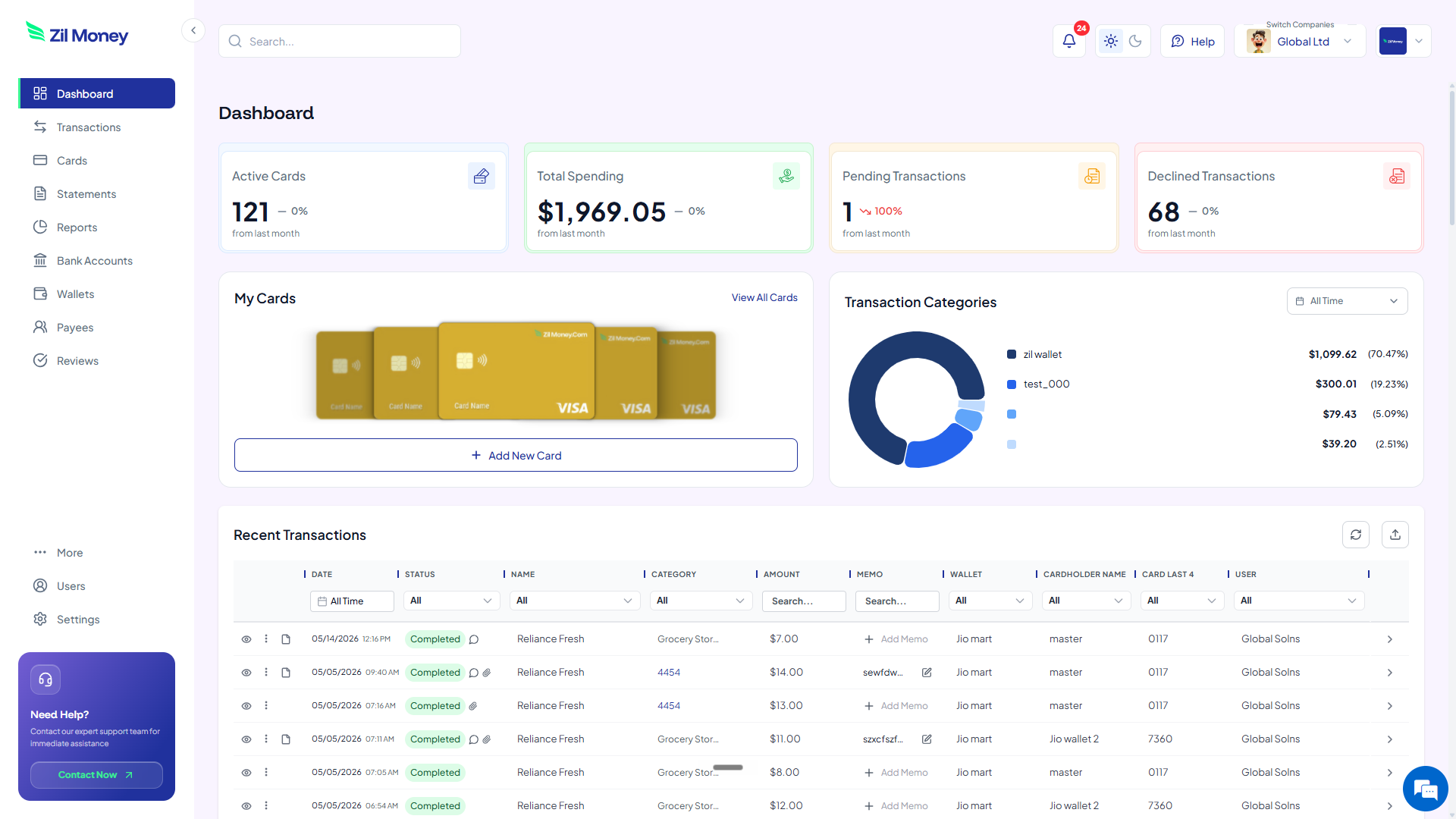
Your travel program in one dashboard.

Watch every charge land, by trip and by traveler. Issue, freeze, top up, or close any card from the same screen.

Virtual Card Maker dashboard showing active cards, total spending, pending and declined transactions, and a live recent-transactions feed
Live dashboard Active cards, total spend by traveler, declined attempts, and every charge as it happens.
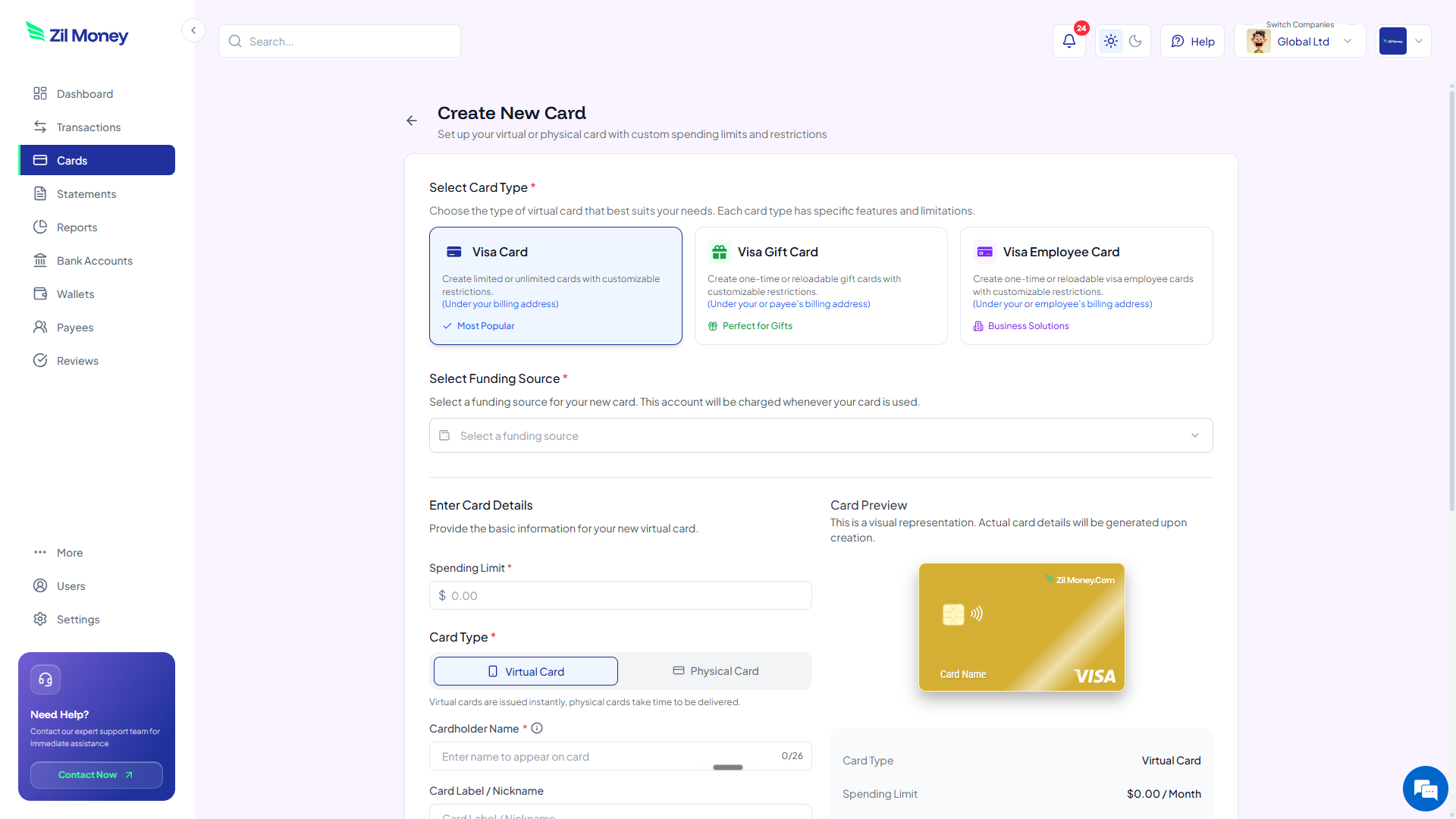
Create New Card form in Virtual Card Maker, with options to pick a Visa card type, set a spending limit, and choose between virtual or physical card
Issue a trip card in minutes Pick the card type, set the daily limit, choose virtual or physical, send to the traveler.
Controls

What you can set on every trip card.

ControlWhat you setWhy it matters
Daily limitPer-day amountTransactions over the daily limit are declined based on your controls.
Trip datesStart and end dayThe card only works during the trip. Ends the day after.
Store typesTravel store types onlyThe card only works at travel stores. Other charges are declined.
Country or regionOptional restrictionThe card only works in the places you pick.
Cardholder nameThe traveler's nameMatches their ID when hotels do pre-auth.
In practice

Three ways teams use trip cards.

SF conference / 4 days

Sales rep at a 4-day conference. Card limit: $300 a day. Works at hotels, restaurants, and Lyft. Active Sept 18 to Sept 22. The rep taps at the W Hotel and four dinners. Leftover $312 comes back Sept 23.

Sales rep / monthly travel

Sales rep on the road 14 days a month. One card per month. $5,000 limit. Travel stores only. Resets every month. Charges are tracked automatically for travel documentation.

Executive recruiting trip

VP flying to interview a candidate. $1,500 card for the flight, hotel, and dinner. Active until Friday at midnight.

Need cards for other kinds of spend? See SaaS subscriptions, department budgets, or payroll cards.

FAQ

Common questions.

Can travelers use the card in other countries?+
Yes. The card works anywhere Visa is accepted. Other countries are fine. Visa's standard rules for international charges and currency fees apply.
Can travelers tap to pay with Apple Wallet or Google Wallet?+
Yes. They add the card to their wallet and tap to pay at hotels, restaurants, taxis, and any tap-to-pay terminal.
What if the traveler needs more money during the trip?+
Raise the limit from your dashboard. The traveler does not have to do anything. Their card balance goes up.
Does this replace our expense report system?+
For most travel spending, yes. Charges are captured automatically, but employers should still keep required receipts and business-purpose records to support IRS accountable plan compliance. See IRS Publication 463 for guidance.
What about hotel incidentals or charges that post after the trip ends?+
Some hotel incidentals and delayed charges may post after the trip ends, so teams may want to extend the card window when needed.
What if the card is lost during the trip?+
Cancel the lost card in your dashboard. Make a new one. Push it to the traveler's wallet. They keep going.
Can I use a virtual card to book flights and hotels?+
Yes. A virtual Visa works for flights, hotels, and rental cars anywhere Visa is accepted online. Set the cardholder name to match the traveler so it lines up with hotel pre-authorization and ID checks.
Do virtual cards work for corporate travel programs?+
Yes. Issue one card per trip or per traveler against your corporate travel policy, set the daily limit to your approved rate, and track every charge in one dashboard instead of collecting expense reports.
What is a per-diem virtual card?+
It is a virtual card whose daily spending limit is set to your per-diem rate. A charge above the daily cap is declined, so the limit enforces the per-diem policy without checking receipts line by line.
Can a travel agency issue virtual cards for client trips?+
Yes. Open a separate virtual card for each client booking so supplier and trip costs stay separated, and close the card once that trip is paid.

Send the team. Skip the expense report.

Get started online. Make a trip card. Send it to your traveler. They tap to pay. You watch every charge. The trip ends. The card ends.