Issue virtual Visa cards quickly. Sign up →
Use case · Department spend

Virtual cards for departments

Every team gets its own card. Every project gets its own card. Set the budget. Lock the categories. See who spent what. Stop being the gatekeeper for every purchase.

Issue quickly Apple & Google Wallet Bulk via Excel or API

Virtual Card Maker - Powered by Zil Money. Zil Money is a financial technology company, not a bank. Banking services are provided by our partner bank, Member FDIC. FDIC insurance applies only to eligible products with funds held at the partner bank, subject to applicable limits and requirements.

PCI DSS aligned
ISO 9001 Quality Management Certified
ISO 20000 IT Service Management Certified
ISO 27001 Information Security Management Certified
Aligned with NIST SP 800-53 controls
AICPA SOC for Service Organizations
AICPA SOC Service Organization Control Reports
Two department managers reviewing budgets on a laptop with a gold Zil Money.Com Visa card
The problem

One shared card. Month-end reconciliation hell.

If you have ever tried to answer 'how much did marketing spend on ads last week,' you know the pattern. The shared card was a shortcut. It is now the bottleneck.

  • Finance is the gatekeeper. Every non-routine purchase needs a human approval. The team waits.
  • Department heads fly blind. No live view of their own spend. They find out at month-end.
  • Reconciliation is a marathon. Categorize every line item by hand. Match charges to departments after the fact.
How we fix it

One card per team. Real-time budgets.

Each department gets its own virtual Visa card with its own monthly budget and category lock. Each project gets a sub-card. Admins can give department heads permission to issue and manage cards within approved limits. Finance sees everything, tagged by department.

  • One card per team or project. Marketing has its own card. Engineering has its own. The Q2 launch has its own. No more 'whose charge is that.'
  • Project-level budgets. Set a monthly recurring budget per team or a one-time budget per project. Transactions over the set budget can be blocked based on your controls.
  • Category controls per team. Engineering equals cloud plus SaaS. Marketing equals ads plus events. Sales equals travel plus hospitality.
  • Reporting by tag. Every card is tagged by department and optional project. Spend rolls up in your dashboard and can be exported for your accounting or GL workflow.
  • Works alongside other use cases. Same wallet funds contractor payments, business travel, and more.
How it works

Four steps to self-serve department spending.

  1. Set up departments and budgets. Marketing $40K a month, Engineering $25K, Sales $15K. One row per team.
  2. Issue department cards. Each department head gets a card scoped to their budget with the categories they need.
  3. Spend happens in the open. With admin-granted permissions, department heads can issue sub-cards for vendors, freelancers, or one-off projects within their approved limits.
  4. Reports auto-route. Every transaction is tagged by department. Month-end is a single export, not a reconciliation project.
See it in action

Your department spend in one dashboard.

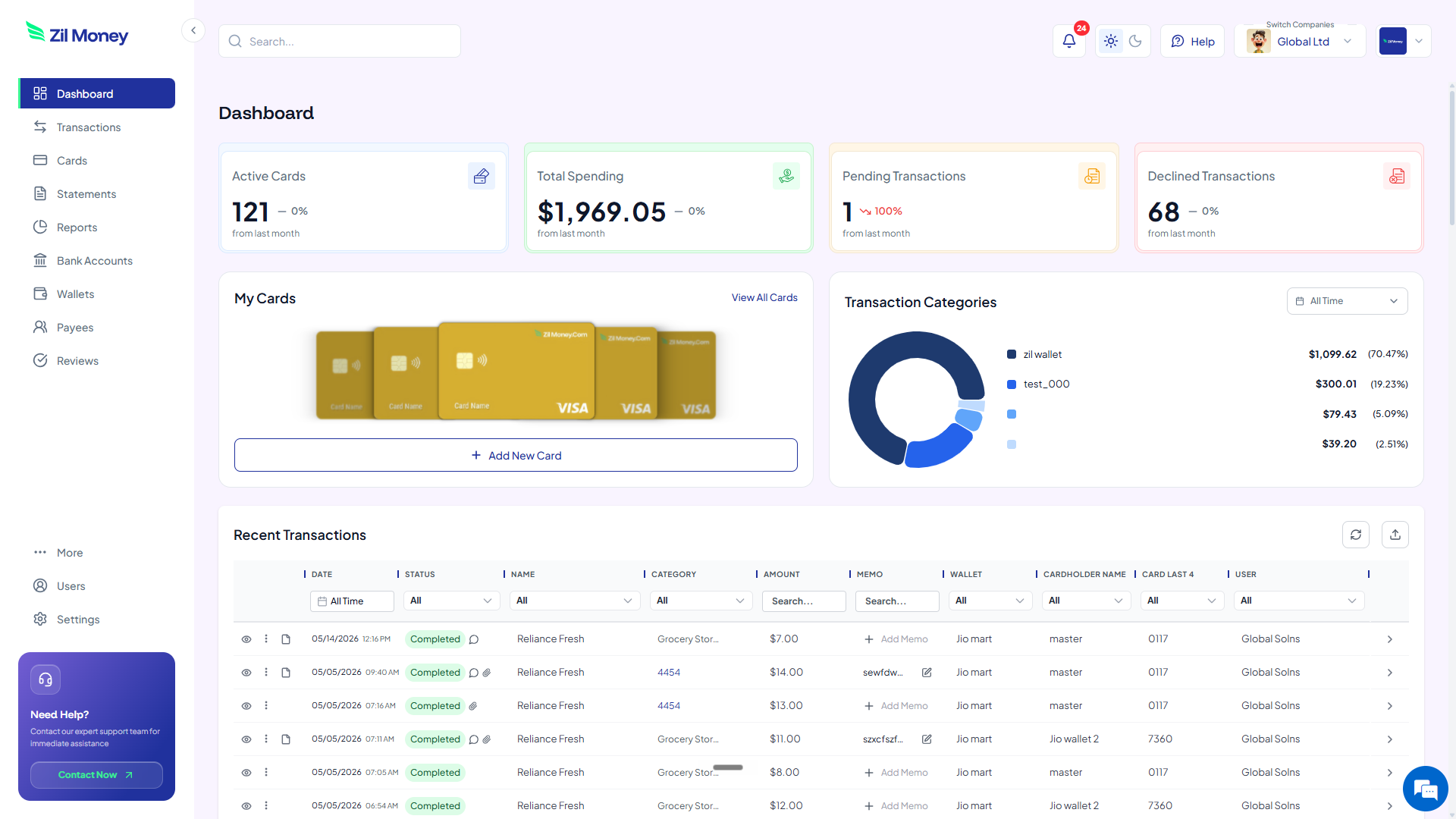
Watch every charge land, by department and by project. Issue, freeze, or close any card from the same screen.

Virtual Card Maker dashboard showing active cards, total spending, pending and declined transactions, and recent activity for virtual cards for departments
Live dashboard Active cards by department, total spend by team, declined attempts, every charge as it happens.
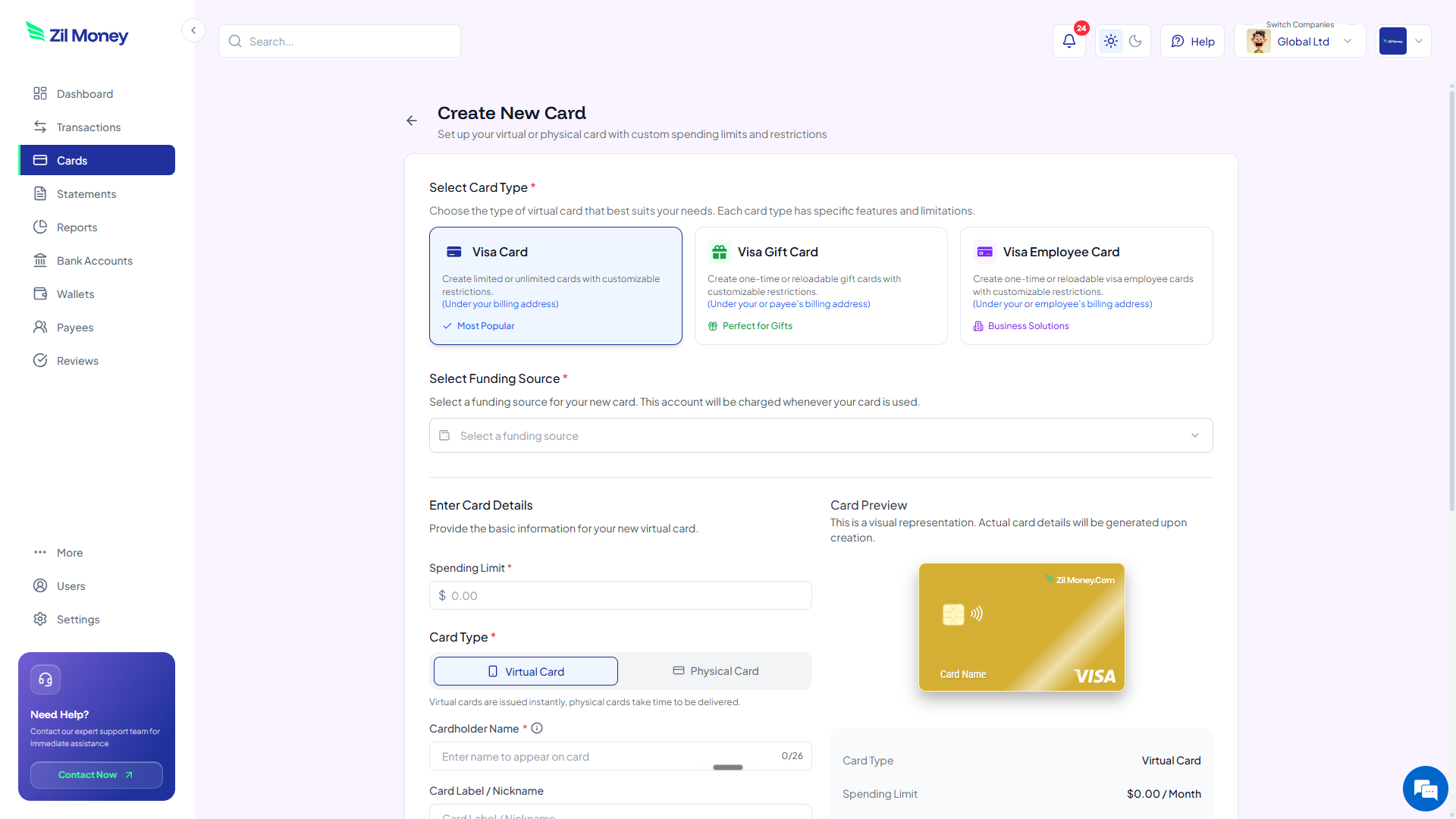
Create New Card form in Virtual Card Maker, with options to pick a Visa card type, set a spending limit, and choose between virtual or physical card
Issue a department card in minutes Pick the card type, set the monthly budget, lock the categories, hand it to the team lead.
Controls

What you can set per department card.

ControlWhat you setWhy it matters
Monthly budgetRecurring or one-timeCaps department spend based on your controls.
Category whitelistAllowed store typesEngineering cannot charge a restaurant. Sales cannot charge AWS.
Department tagTeam name or codePer-department spend rollup in your dashboard.
Admin permissionsWho can issue sub-cardsDepartment head self-serves without a finance ticket.
Sub-card limitCap per sub-cardDepartment head can issue cards up to a per-card ceiling.
In practice

Three ways teams run department spend on virtual cards.

Marketing / Q2 campaign

Marketing has a $40K monthly card. For the Q2 launch, the CMO issues a $15K sub-card locked to ads and event vendors. Campaign ends. Sub-card closes. Leftover returns to the marketing budget.

Engineering / SaaS

Engineering's $25K card is locked to cloud and SaaS. The VP Eng issues vendor cards for Notion, Linear, AWS, and GitHub. Each one at the contract amount, all from within that budget.

Sales / travel pool

Sales gets a $15K travel pool card. Each rep gets a sub-card for their trips. Finance sees individual trip spend without issuing a card directly.

Need cards for other kinds of spend? See contractor payments, SaaS subscriptions, or business travel.

FAQ

Common questions.

Can department heads issue their own cards?+
Admins can give department heads permission to issue and manage cards within approved limits, without going through finance for every request.
How do I tie card spend back to a department for reporting?+
Every card is assigned a department tag at issuance. Spend rolls up by tag in your dashboard and can be exported for your accounting or GL workflow.
What happens when a department's budget is exhausted?+
Transactions over the set budget can be blocked based on your controls. The department head gets a notification and can request a budget increase.
Can I set different category restrictions per department?+
Yes. Engineering cards can allow cloud and SaaS spend. Marketing cards can allow ads and event vendors. Sales cards can allow travel and hospitality. You set the rules per card or per department default.
Do budgets refresh automatically each month?+
Yes. Monthly recurring budgets reset on the day you choose. Project budgets can be one-time or open-ended.

Stop being the gatekeeper for every purchase.

Get started online. Issue your first department card. Let team leads spend within their approved limits while you watch live totals roll in.