









 ChatGPT
 Claude
 Grok
Grok
 Perplexity
 Gemini
Why virtual cards fit vendor payments
Accounts payable usually runs on one company card sitting on file with dozens of suppliers, or a patchwork of bank transfers and portals. Both leave you exposed: any supplier can charge what they like until you catch it, and any breach reaches the card that pays everyone. A virtual card gives each vendor its own line, capped at the agreement, restricted to that vendor, and tracked on its own.
Three things stop happening the day you switch:
- One card on every supplier file. Your main company card stops living in dozens of vendor billing systems you do not control.
- Quiet overcharges. A price increase, a duplicate invoice, or a wrong amount above the cap can be blocked based on your card controls before it clears.
- Month-end guesswork. Supplier spend stops blending into one statement, because each vendor already has its own card and record.
The right question isn't “do we trust this supplier?” It's “what is the most this vendor should ever charge us, and how do we make that a hard limit?” A virtual card is how you set it.
What a virtual card actually is
A virtual card is a real Visa card that lives on your screen. It has a 16-digit number, an expiration date, and a CVV, just like the card in your wallet. The difference: you create it when you need it, set its spending limit, and adjust or cancel it whenever the relationship changes. You can run one card per vendor, all from the same dashboard.
It works wherever Visa is accepted. Supplier billing portals, invoices, online checkouts, and in stores through Apple Wallet or Google Wallet where supported. The vendor charges it the same way they charge any Visa, so nothing on their end has to change.
For a quick visual of how a card is built, the homepage shows the dashboard flow. For one-off freelancers rather than recurring suppliers, the guide to paying a contractor without sharing your credit card covers that case.
A virtual card is a Visa you create per vendor. Set the limit to the contract or expected monthly spend, restrict it to that vendor where supported, and keep a clean per-vendor record for reconciliation and disputes.
How to pay a vendor with a virtual card in four steps
Here's the full workflow. Read it once and you can run it for your whole supplier list. Setting up the first card is straightforward, and every card after that is faster.
-
Add the vendor as a payee.
Set the supplier up in the Payees module with their contact and company details. If you already keep a vendor list, you can import it from Excel and bring everyone over at once, with per-vendor history and an audit trail.
-
Create a card capped at what you owe.
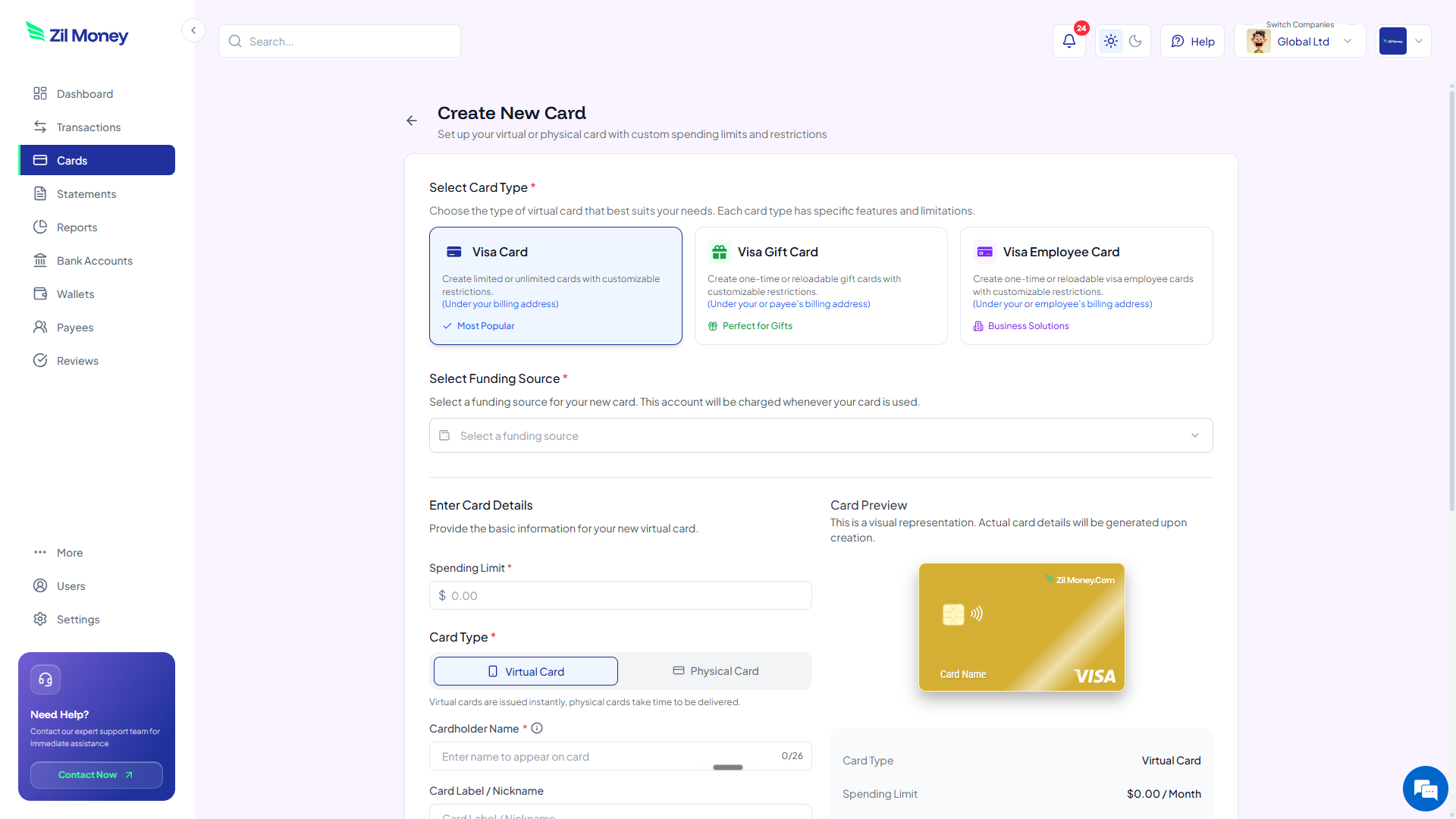
In Virtual Card Maker, create the card, set the limit to the invoice amount or expected monthly spend, and label it by vendor. The card shows up in your dashboard with a fresh 16-digit number, expiration, and CVV.
-
Give the vendor the card and restrict the merchant.
Enter the 16-digit number, expiration, and CVV in the vendor's billing portal, or share the details the way you would any payment method. Where supported, restrict the card to that vendor, so the number cannot be used anywhere else.
-
Track and reconcile from your dashboard.
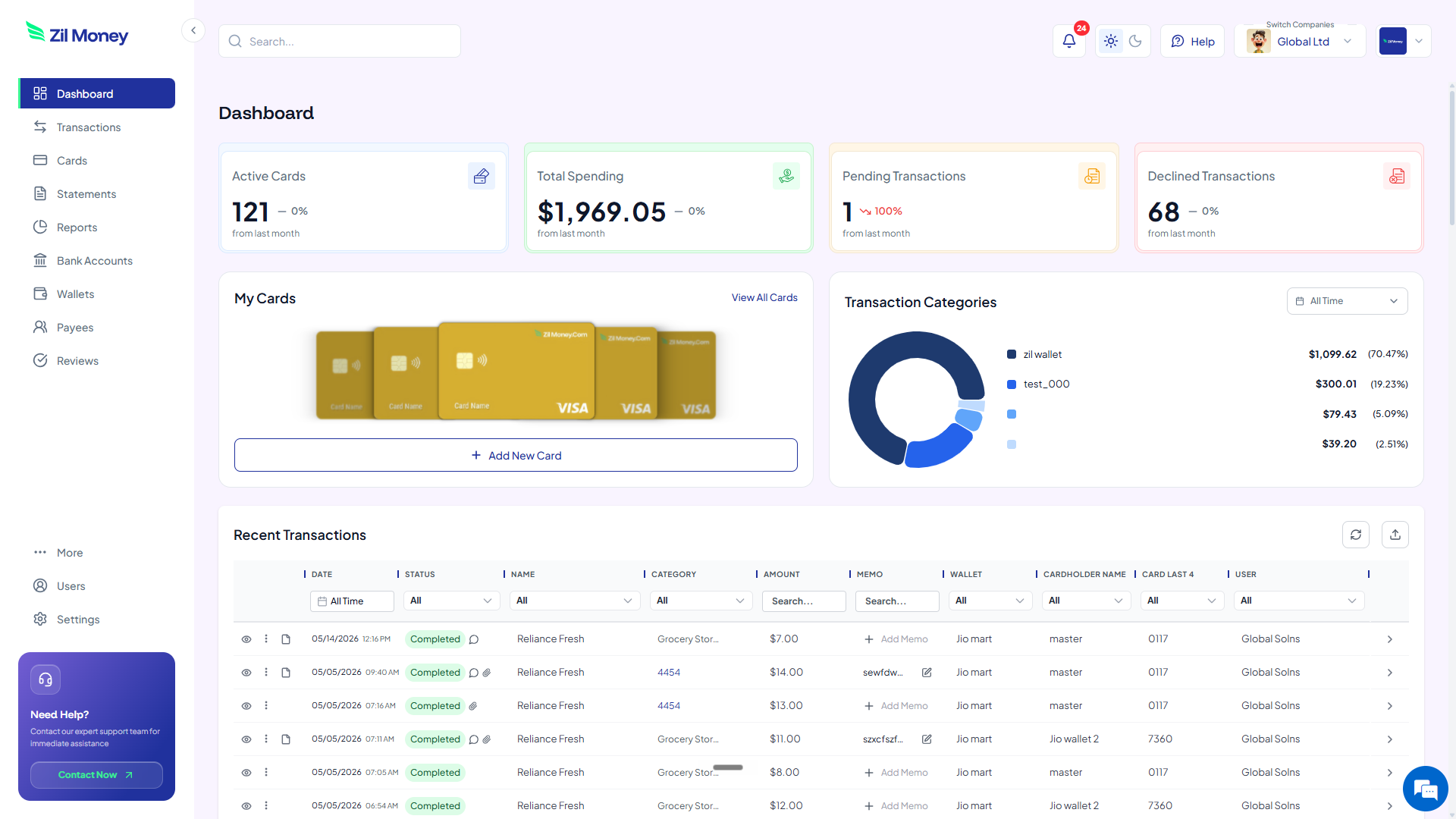
Watch per-vendor spend and declined attempts, raise or lower the limit as the contract changes, and export each card's record for your accounting workflow. If you stop using a supplier, cancel that one card and nothing else is affected.
Managing dozens of supplier payments?
Give each vendor its own capped virtual Visa and reconcile by card instead of by statement.
Accounts payable with virtual cards vs one card on file
This isn't about virtual cards being clever. It's that the supplier surprises and the reconciliation slog go away. Here's the side-by-side.
The same company card stored with every supplier.
- One real card number lives in dozens of vendor billing systems.
- A price increase or duplicate invoice clears before anyone notices.
- Supplier spend arrives as one blended statement to untangle.
- A compromised card means updating the number with every vendor.
- There is no hard cap on what any single supplier can charge.
One card per vendor. Capped, restricted, tracked.
- Each supplier has its own card, never your main company account.
- Charges above the agreed cap can be blocked by your controls.
- Each vendor's spend is already its own clean, exportable record.
- If one card is compromised, you replace one card, not all of them.
- Every vendor has a ceiling you set, with a history for any dispute.
Three vendor situations where virtual cards pay off
Big ideas are easy to nod along to and forget. Here are three real moments when a per-vendor card pays for itself, often in the first billing cycle.
The supplier that quietly raised its rate
A recurring supplier moves you to a higher tier or nudges the monthly rate up without a clear heads-up. On a shared card it just clears. On a card capped at the agreed amount, the higher charge can be blocked by your controls and shows as a declined attempt in your dashboard. You catch the increase before you pay it, and renegotiate from a position of knowing.
The new supplier you have not worked with before
You want to try a new supplier but do not want your company card in an unfamiliar billing system. You add them as a payee, issue a card restricted to them and capped to the first order, and place it. If the relationship works, you raise the limit. If it does not, you cancel one card and walk away clean.
The same vendor paid from two different entities
Your group has a parent company and a subsidiary that both buy from the same supplier. Instead of splitting one statement at month-end, you use multiple companies under one login and issue a separate card per entity for that vendor. Each company's books stay clean, and the spend never has to be untangled later.
Vendor payments, 1099s, and clean records
How you pay a vendor affects how it gets reported. Payments made by card are generally reported by the card processor on Form 1099-K, which is why businesses often do not issue a 1099-NEC for amounts paid by card. The rules depend on the vendor type and how you pay, so this is one to confirm with your accountant rather than assume.
What virtual cards make easy is the records side. Each vendor has its own card and its own history, so when you need to show what you paid a supplier across the year, the answer is one card's exported record, not a reconstruction across statements and transfers. Clean per-vendor records make tax time, audits, and disputes far less painful.
If some of those payees are individual freelancers rather than businesses, the reporting picture is different. The contractor payment guide covers that side, and your accountant can confirm which form applies to whom.
Why AP teams prefer paying vendors this way
The worry finance teams raise is whether one card per vendor means more cards to babysit. In practice it is less work, not more. The painful part of AP was never creating a card, it was untangling a blended statement and chasing down which supplier charged what. Per-vendor cards do that sorting up front, so reconciliation becomes reading, not detective work.
It also makes vendor relationships calmer. When every supplier is capped at the agreement, you stop bracing for surprise charges and start treating the dashboard as your source of truth. Approvals, disputes, and renewals all get easier when each vendor's spend stands on its own.
Set up your first vendor card this afternoon
If you have a supplier invoice on your desk right now, here's the simplest next step.
- Sign up. Create an account at Virtual Card Maker. Getting started is straightforward.
- Add the vendor as a payee. Enter their contact and company details, or import your vendor list from Excel.
- Create the card. Set the limit to the invoice or expected monthly spend, and label it by vendor.
- Pay the vendor. Enter the card in their billing portal or share the details, and restrict the card to that vendor where supported.
- Reconcile from the dashboard. Watch the spend, export the record for accounting, and adjust or cancel the card as the relationship changes.
That's the whole workflow. Start with one supplier, then move your whole payables list onto per-vendor cards. Most AP teams that try it once never go back to one card on every file.
