









 ChatGPT
 Claude
 Grok
Grok
 Perplexity
 Gemini
Why one card per department beats one card per company
Every finance team has versions of the same problem. One company card across every team means one shared CVV, one shared limit, and one shared blast radius if anything goes wrong. The bottleneck becomes whoever holds the card. Routine purchases that should take five minutes route through Slack threads and approval tickets instead.
One virtual Visa per department flips that. Each team has its own card with its own monthly cap matching its own line item in the budget. The team lead can buy what the team needs without asking. Finance sees the spend land in the dashboard live and intervenes only when it has to.
Three things stop happening the day you switch:
- Approval-queue bottleneck. Routine purchases stop routing through finance for sign-off. The cap is the sign-off.
- One shared card number across the company. If a department's card is compromised, the blast radius is one team's cap, not the whole company.
- Surprise overruns. A team can't blow past its monthly budget by accident. The cap declines the charge before it lands.
What a department card actually is
A department card is a virtual Visa with a name on it, a monthly cap, and an owner. The name is the team. The cap is what finance and the team lead agreed on for this month or this quarter. The owner is the person who decides what the team buys, but who can't change the cap on their own.
It works anywhere Visa is accepted, including Apple Wallet and Google Wallet where supported. SaaS subscriptions, event tickets, freelancer invoices, marketing experiments, conference travel - if a team would normally need to ask for a card, the team card buys it.
The card is the budget. If the team has $4,000 a month for tools and experiments, that's the cap. Spend up to it, anytime, no approval thread. Spend past it, declined at the gate. The lead and finance both see the same number, all month.
How to put departments on virtual cards in four steps
This is the full workflow for one team. After the first card, every team card after that is much faster to issue.
-
Agree the monthly budget for the team.
Don't guess. Pull the last three months of that team's actual spend, average it, and round up. That number is the cap. Document the cap in the budget so finance and the lead see the same figure.
-
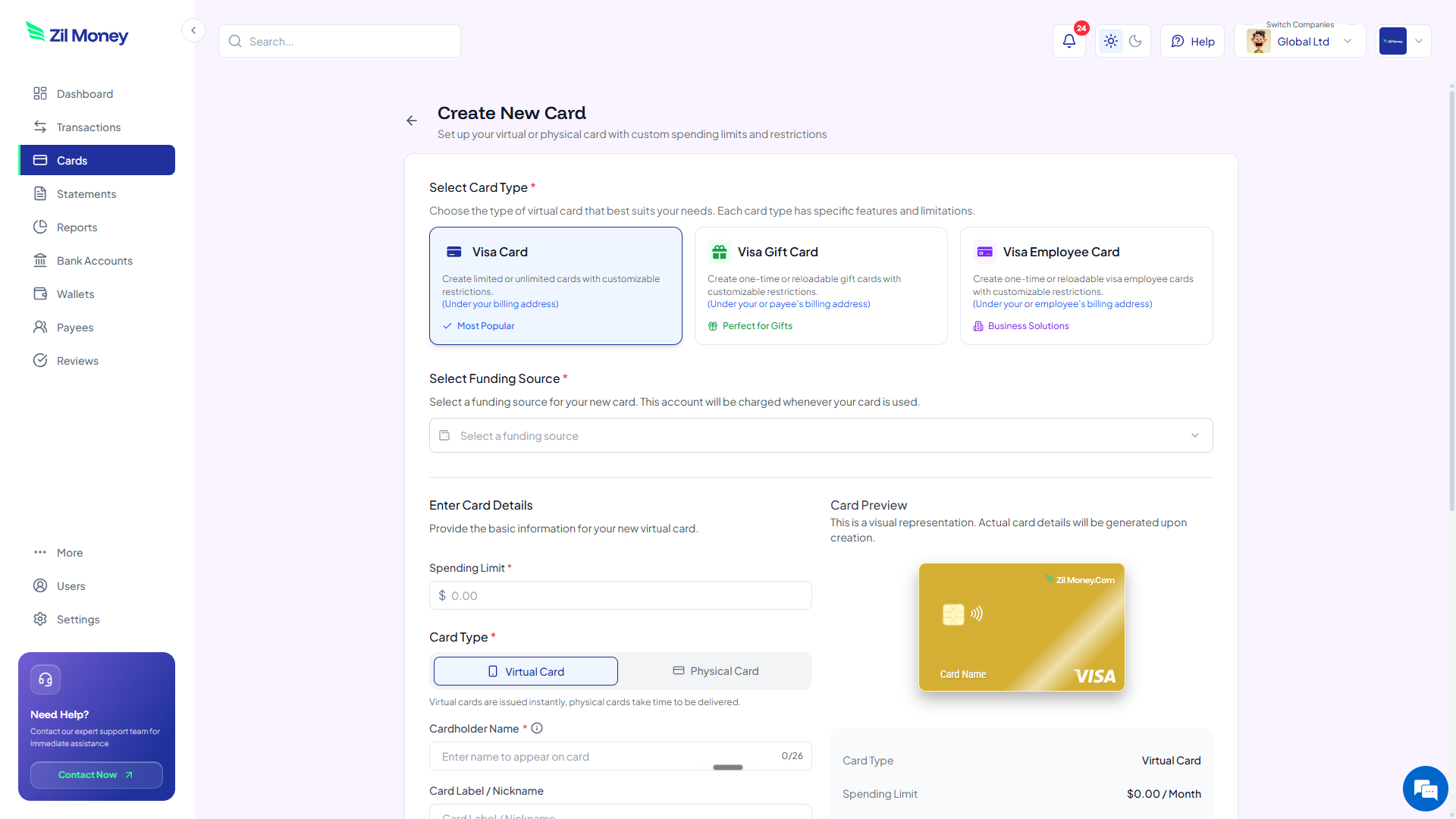
Issue a virtual Visa for the team.
Name the card after the team (“Marketing - Q2”, not “Card 7”), set the cap, and tag the cost center. The card shows up in your dashboard with the team name on it, so statements read like a budget instead of a list.
-
Hand the card to the team lead.
Share the card details so they can add it to a mobile wallet and use it where needed. Make it clear what the card is and isn't for, and where the cap is documented.
-
Watch the dashboard, not the inbox.
Spend lands live. If a team is on pace to hit the cap two weeks early, you see it the moment it starts. If something looks off (unfamiliar merchant, weird hour, doubled charge), pause the card in one click and ask the lead. The conversation happens before a statement closes, not after.
Move one team off your shared corporate card this afternoon.
Sign-up is quick. Pick your noisiest team and roll out their card without delay.
Department spending: with cards vs without
The change isn't about adding controls. It's about putting the budget on the rail it already lives in. Here's the side-by-side.
One shared company card. Approval Slack threads. Statements weeks later.
- Routine $80 purchases require a ping to finance for the card number.
- Finance becomes the gatekeeper for purchases finance doesn't care about.
- Overruns surface a month later when the statement arrives.
- Compromise on the shared card forces an org-wide card swap.
- Department-level budget tracking happens in a spreadsheet, by hand.
One Visa per team. Cap is the budget. Spend in real time.
- The team lead buys what the team needs without asking. The cap is the rule.
- Finance sees spend live, not after the fact, and intervenes only when needed.
- Overruns can't happen by accident - the charge is declined before it clears.
- Compromise hits one card. Pause the card, issue a new one, the rest of the org is unaffected.
- Department-level tracking comes free. The card is the cost center.
Three department moments where per-team cards pay off
The wins aren't dramatic. They're a few minutes every week, and the absence of a few specific bad moments.
The marketing experiment that needed approval at 11 p.m.
Marketing wants to push $200 behind a paid pilot tonight while the test is fresh. With one shared corporate card, they wait for someone with the card number to wake up. With a team card sitting in marketing's mobile wallet, they push the pilot at 11 p.m. If finance has set the cap at $4,000 for the month, the $200 is inside it and nobody needs to be paged.
The engineering tool that crept up in price
An engineering observability tool moved from $260 to $400 a month. On a shared card with no per-team cap, the charge cleared and nobody noticed for three months. On a team card with a $300 cap that matches the budget, the new charge fails. Engineering and finance now have the conversation about whether the higher tier is worth it.
The team lead who left the company
A team lead leaves on Friday. On a shared card, you rotate the company's primary card and update every vendor on file. On a department card, you close one card, issue a new one to the new lead, and update billing on just that team's vendors. The blast radius is one team.
Cleaner reconciliation by cost center
Department cards do more than control spend. They turn the cards themselves into the cost-center tagging. Each card is one team. The statement reads like the budget reads. The export goes straight to the right line in the general ledger.
That changes month-end. Instead of a bookkeeper splitting 120 line items across eight cost centers by reading merchant names, the bookkeeper imports a card-per-team report and the categorization is already done. Audit trail comes from the same export.
Who should hold each card
The pattern that works in most teams: one card per department, owned by the team lead, with finance as a backup admin. The lead can use the card and request a cap change. Finance can pause the card, close it, raise the cap, or transfer the card to a new lead. The cap is documented in the budget tool the team uses (a doc tool, a spreadsheet, whatever fits).
For larger teams, you can split the lead's cap further. Marketing gets one card. Inside marketing, the events sub-team gets its own card with a slice of the marketing cap. The split is administrative, not financial - the marketing budget didn't change, it's now visible at finer grain.
Hand your first team its own card this afternoon
Don't try to move every team in one week. Start with the team that's asking finance for the card number most often.
- Sign up. Create an account at Virtual Card Maker. Sign-up is quick.
- Add funds. Load this team's monthly cap plus a small buffer. You don't have to fund every team's budget at once.
- Issue the card. Name it after the team. Set the cap to the documented budget. Tag the cost center.
- Hand it to the lead. Share details so they can add it to a mobile wallet. Note the cap and what the card is for.
- Watch the dashboard. Spend lands live. Adjust the cap next month with real data instead of last year's guess.
One team, one card, one cap. After the first team runs on this for a month, the rest tend to follow.
