









 ChatGPT
 Claude
 Grok
Grok
 Perplexity
 Gemini
Why a shared card fails before the first invoice arrives
Most businesses do not plan their ad spend cards. They start with one shared card, add a second ad account, then a third, and by the time five channels bill to the same number, nobody remembers which charge belongs to which campaign. The problem shows up on the statement, but it started earlier, at the moment nobody decided what a "card" should represent in the first place.
A virtual card for ad spend fixes this, but only if you make the setup decision before you issue anything. That decision has three parts: what boundary each card represents, how big its cap should be, and who is responsible for it. Skip this step and you end up issuing cards reactively, one at a time, after a problem already happened.
Get the setup decision right once, and three things stop happening:
- Guessing at the cap after the campaign is already live. The number is decided before launch, not adjusted in a panic mid-month.
- Reissuing cards because the boundary was wrong. One card per platform, campaign, or client is chosen upfront, so a new campaign does not force a redesign.
- Nobody knowing who is responsible for a card. Each card is named for the person or account that holds it, so the question "whose spend is this" has a one-word answer.
What a virtual card actually is
A virtual card is a real Visa card that exists on your screen instead of in your wallet. It has a 16-digit number, an expiration date, and a CVV, the same as a physical card. You create it when you decide it is needed, fund it from your wallet, and set its spending limit at the moment of issuing it. It works at most merchants where Visa is accepted, including ad platform billing, subject to merchant support and network conditions.
Because you create the card yourself, you also decide, before it exists, what it is for. For the full mechanics of setting limits and restricting a card once it is live, see how to control ad spend with a virtual card. This guide covers the decision that comes before that: what the card should represent in the first place.
Before you create a single ad-spend card, decide the boundary it represents (platform, campaign, or client), add headroom above the planned budget when you set the cap, and pick who is named on it.
Your virtual card for ad spend, in four setup steps
This is not the workflow for watching a card once it is live. It is the short decision that comes before you issue the card at all.
-
Pick the boundary.
Decide whether a card represents one platform, one campaign, or one client. Per platform works if you mainly want to compare channels against each other. Per campaign works if you run several tests at once and need to know which idea earned its keep. Per client works if you manage paid media for other businesses. Pick one pattern for now, since you can always add a second pattern for a different part of the business later.
-
Size the cap with headroom.
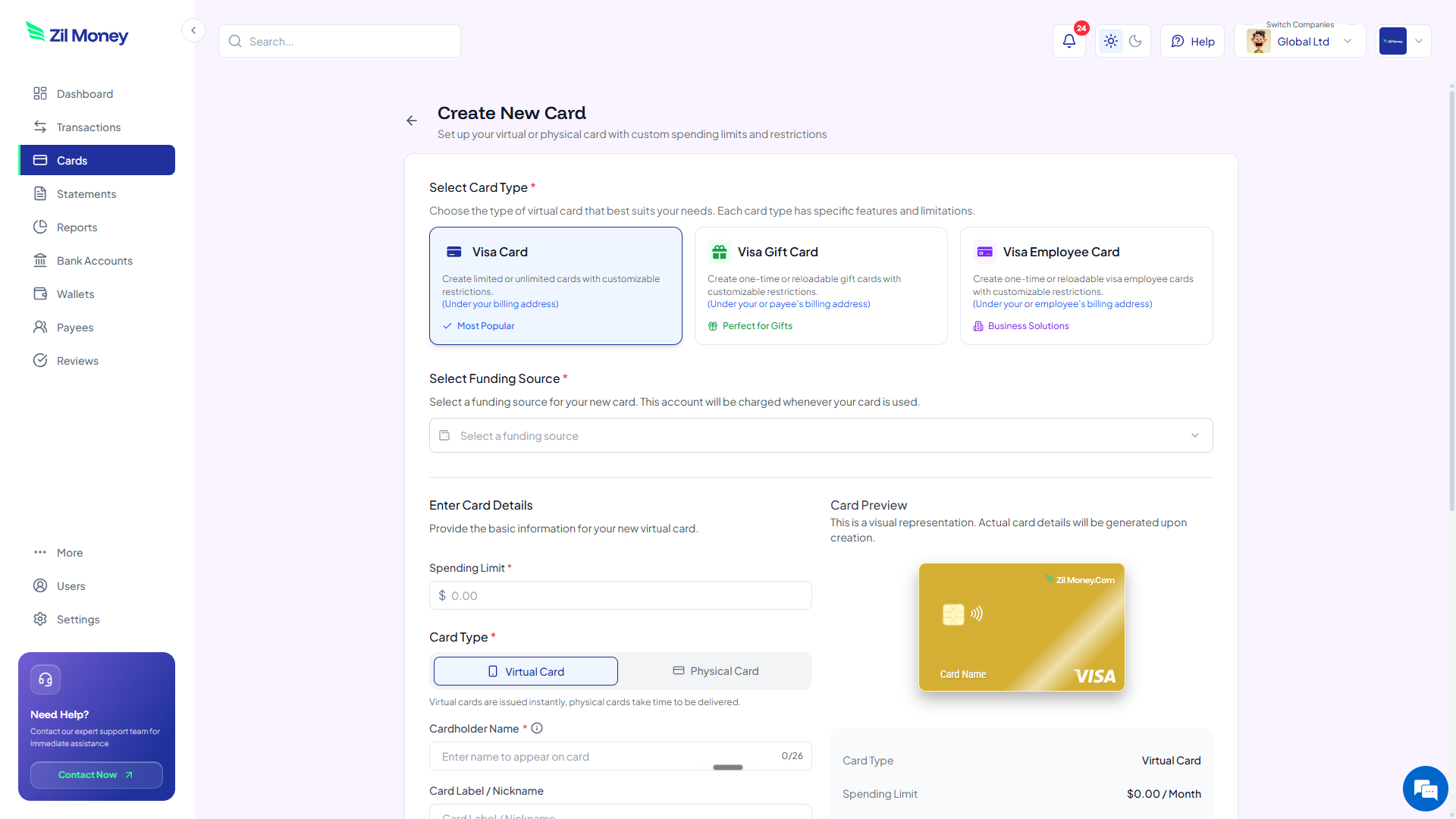
Start from the monthly figure you already planned to risk on that boundary, then add roughly 15% above it. A cap set to the exact planned number can decline a legitimate charge the moment a campaign performs a little better than expected. In Virtual Card Maker, set the limit when you create the card and label it clearly, for example by platform and client name, so the number and the name match your plan from day one.
-
Decide who holds the card.
Name the card for whoever actually enters it into the ad platform. If an agency runs the account, the card is capped at their media budget and labeled with their name. If your own team runs it, the card is labeled by the staff member or the channel instead. Deciding this upfront means you never have to ask "whose card is this" later.
-
Set the cancellation trigger before you launch.
Decide in advance what event ends the card: a campaign end date, a scheduled budget review, or a client contract ending. When that event arrives, cancel the card from your dashboard, and any unspent balance returns to your wallet. Deciding the trigger now means the card does not sit active after the reason for it is gone.
Planning next month's ad accounts?
Decide the boundary and the cap first, then issue a capped virtual card for each one.
Issuing ad-spend cards with a plan vs. without one
The difference is not visible on day one. It shows up three months later, when the account list has grown and someone asks why the cards do not match the way the business actually runs its campaigns.
Cards get created one at a time, as problems come up.
- A new campaign launches and someone issues a card without deciding whether it should match the platform, the campaign, or the client.
- Caps get set to round numbers instead of the actual budget already agreed for that account.
- Nobody's name is attached to half the cards, so a spend question has no clear owner.
- Cards outlive the campaign they were meant for, because nobody decided when to cancel them.
- Every new client or channel means redesigning the whole card structure from scratch.
New accounts slot into a pattern you already chose.
- A new campaign gets a card that follows the boundary you already picked, platform, campaign, or client.
- The cap matches the planned budget plus headroom, not a round number picked under pressure.
- Every card is named for the person or account responsible for it.
- The cancellation trigger is known in advance, so cards get closed out instead of forgotten.
- Adding a new client or channel means issuing one more card, not rethinking the system.
Three hypothetical setups, to show the decision in practice
These are illustrative examples, not verified customers, but they show the kind of planning that comes before the first card exists rather than a mess getting untangled after the fact.
Hartwell Marketing learned this the expensive way
Hartwell runs paid search and social for six retail clients. For a while, every new client got a card whenever someone remembered to create one, sometimes during onboarding, sometimes only after the first invoice already had one client's spend mixed in with another's. The mix-up meant a week of untangling a shared statement by hand to figure out whose budget paid for what. Now it is a standing rule at contract signing, not a task on a checklist: one card per client, capped at that client's media budget and named for the client, before anyone touches the ad platform.
A per-client boundary hid Renata's best campaign
Renata is a freelance paid-search consultant who manages several small accounts at once. Issuing one card per client told her how much each client spent, but not which specific campaign inside an account was actually earning its keep, since three campaigns sat behind the same card number. Switching the boundary to per campaign fixed that: each test now gets its own capped card from the moment it launches, and her invoice to each client already matches the card history without any manual sorting.
Birchline chose a boundary before its first dollar went out
Birchline is a five-person startup about to run its first paid campaigns across two ad platforms. Rather than waiting to see which platform performs better and trying to separate the spend afterward, the founder issues one card per platform before either campaign goes live, each capped at that platform's share of the month's budget plus headroom. When it is time to compare results, the numbers are already separated by platform, with no sorting required.
Recordkeeping and ad spend
Advertising is generally a deductible business expense when it is properly documented, but confirm the treatment with your tax advisor since it can depend on your entity type and how the expense is used. When the setup decision is made upfront, the recordkeeping happens as a side effect: a card labeled by platform, campaign, or client already sorts every charge the moment it happens, instead of asking someone to reconstruct it later. The IRS's small-business recordkeeping guidance spells out why that documentation matters. For the fuller picture of how card-level records hold up at tax time, see how virtual cards keep ad-spend records clean.
Why marketers plan the boundary before they plan the campaign
The instinct is to launch the campaign first and worry about the card structure later, since the campaign is the thing that actually makes money. In practice, the opposite order works better. Deciding the boundary, the cap, and the cardholder before launch is a short planning step, and it means every decision after that point is a small, repeatable action instead of a judgment call made under pressure. If your business tracks a wider marketing budget beyond just ad platforms (tools, retainers, events), the guide to managing a marketing budget with virtual cards extends the same idea across the whole budget.
Turn the decision into your first ad-spend card
Once you have decided the boundary, the cap, and the cardholder, sign up at Virtual Card Maker, fund your wallet with the planned budget plus headroom, and create the card labeled by boundary and cardholder. From there, the day-to-day work of watching spend, raising a limit, and reacting to a decline is a separate, ongoing habit, covered step by step in this guide.
