

Virtual payroll cards
Issue bulk payroll cards to your team in a single Excel upload. Funds load from your wallet to each recipient's virtual Visa card. No bank account needed from the recipient.











Direct deposit does not work for everyone you pay.
Traditional payroll assumes every recipient has a checking account on file before payday. The reality is different.
- New hires on day one. They have not onboarded their banking info yet. Their earned wages still need to land somewhere.
- Tipped and hourly workers. They often want flexibility around how and when they get paid. Some may not have a traditional bank account.
- 1099 contractors. Varying preferences. Varying account setups.
One spreadsheet. Cards loaded. Recipients paid.
Build a recipient sheet. Upload it. Fund the batch from your wallet. Each recipient gets a virtual Visa card delivered by email. They use it like any Visa card.
- No bank account needed from the recipient. They do not share routing numbers or open an account. The funds arrive on the card.
- Bulk via Excel. Upload a single spreadsheet for your whole team. We issue and load all cards in one pass.
- Reloadable each pay cycle. The recipient keeps an active card across pay cycles, with funds loaded each pay period.
- Funds held at our Member FDIC partner bank. Loaded balances are held in custody at our partner bank, which is Member FDIC. FDIC insurance applies to eligible balances subject to applicable limits.
- Works alongside other use cases. Same wallet funds contractor payments, department spending, and more.
Four steps from pay sheet to loaded cards.
- 01
Build the pay sheet.
One row per recipient with name, email, and pay amount. Add a pay-cycle date for recurring loads.
- 02
Upload and fund.
The dashboard totals the load and pulls from your wallet balance. You approve, the cards load.
- 03
Recipients get the cards.
A branded email with a secure link to access the virtual Visa details. Recipients push to Apple Wallet or Google Wallet to start spending.
- 04
Reload each cycle.
Upload the next pay run. Existing cards reload automatically.
Your payroll runs in one dashboard.
Watch every load and every charge, by recipient. Issue, freeze, top up, or close any card from the same screen.
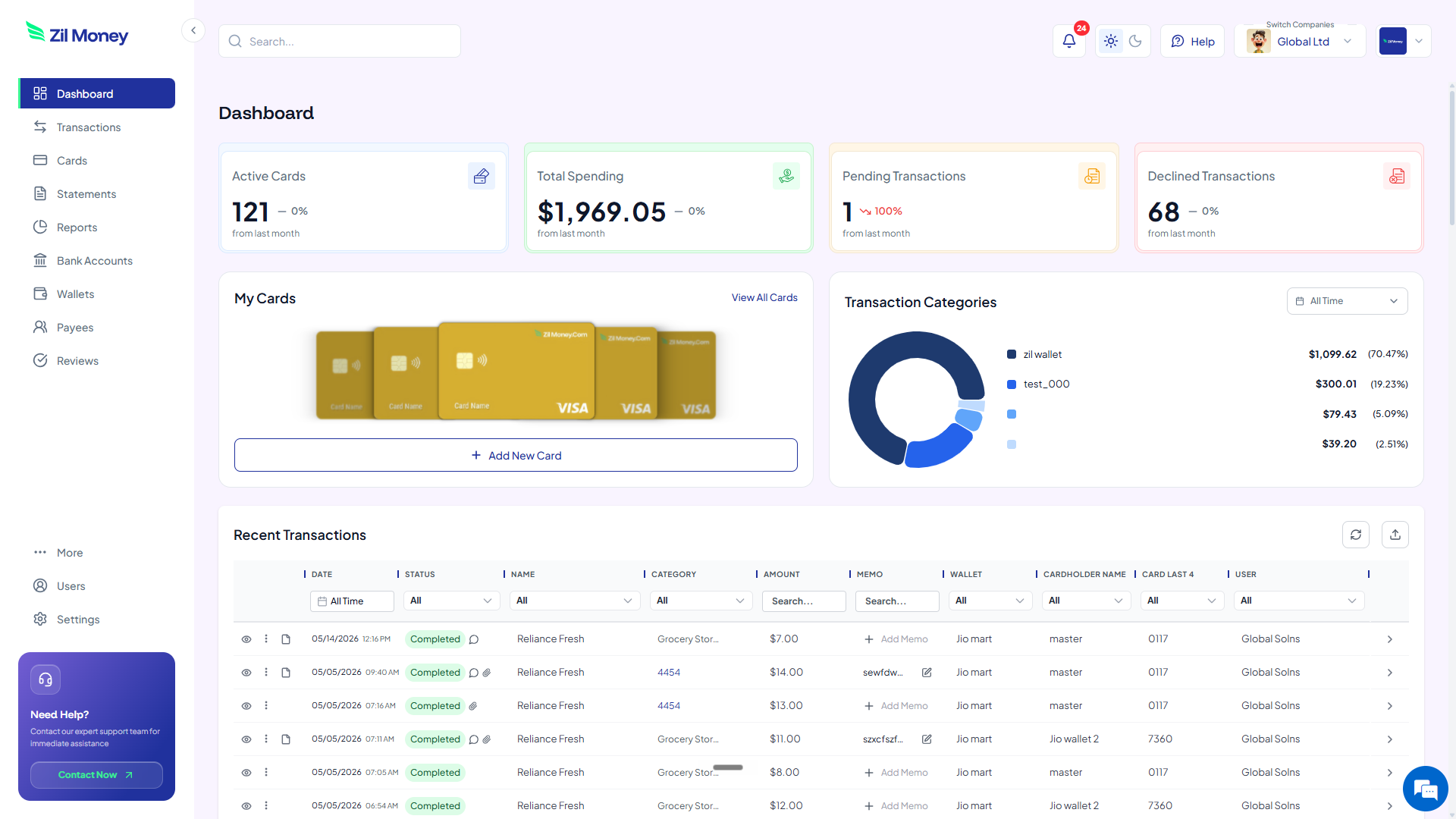
Live dashboard
Active payroll cards, total wages loaded, declined attempts, every charge by recipient as it happens.
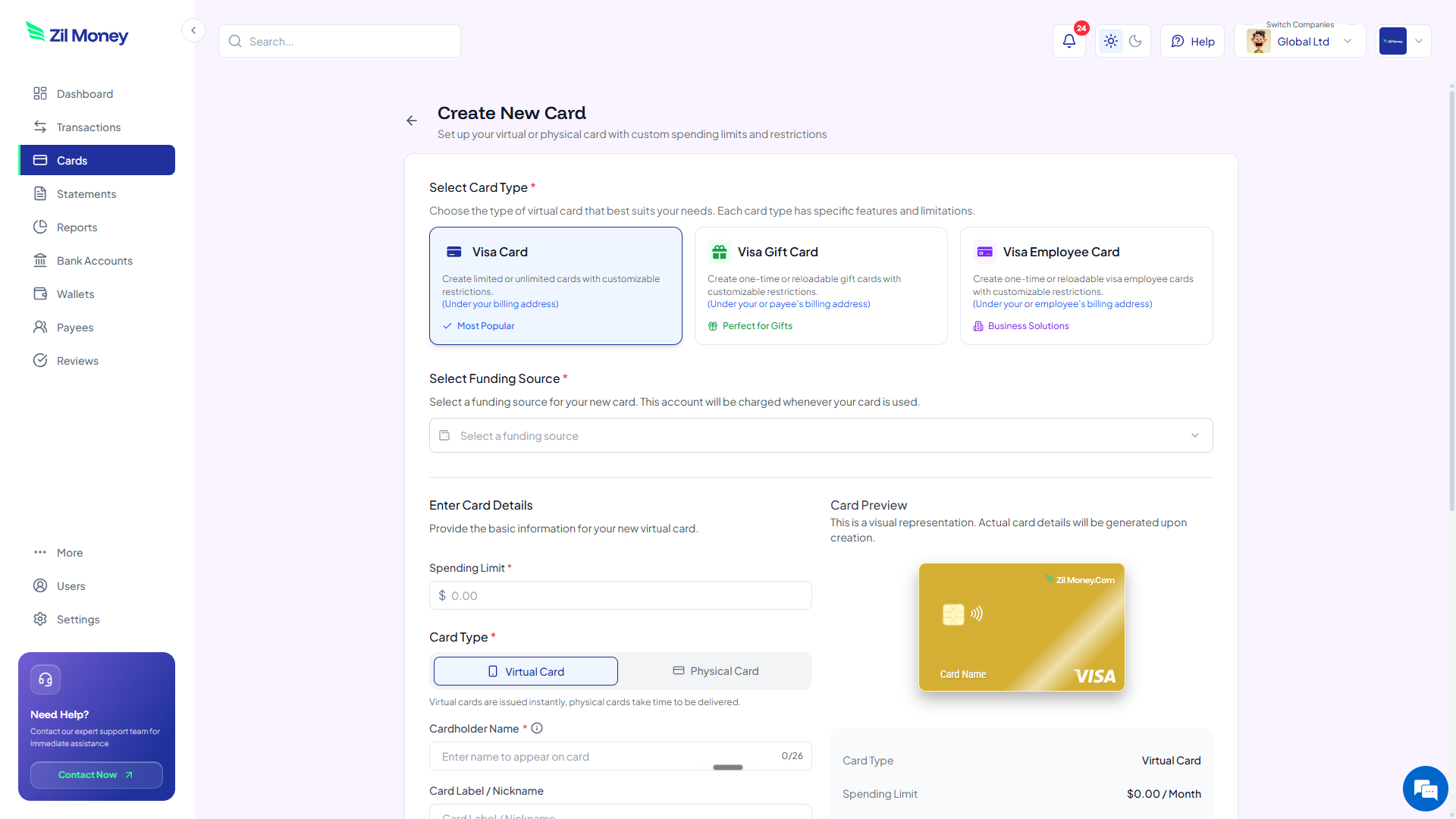
Issue a payroll card in a few clicks
Pick the Employee Card type, set the pay amount, choose virtual or physical, send to the recipient.
What you can set on every payroll card batch.
ControlWhat you setWhy it matters
Per-recipient amount
Set per rowDifferent amounts per role, tier, or hours worked.
Pay-cycle frequency
Weekly, bi-weekly, monthlyRecurring loads on the cycle you choose.
Cardholder name
Per row nameCard matches the recipient's ID.
Recipient classification
Employee or contractorFeeds your own bookkeeping. Virtual Card Maker does not file taxes or payroll forms on your behalf.
Reporting tag
Pay run ID or departmentAudit trail for your bookkeeping.
Three ways teams use virtual payroll cards.
- Restaurant chain / tipped staff
A 50-location chain runs weekly tipped-staff payouts on payroll cards. New hires get a card without waiting on ACH paperwork to set up direct deposit.
- Construction crew / 1099 weekly
A contractor crew gets paid every Friday via virtual cards. The foreman uploads the week's sheet, and cards reload from the same wallet once funded.
- Day labor / onboarding day one
A staffing firm issues cards to day-one workers after the worker chooses the card as their payment method. The worker can start spending once the card is funded.
Need cards for other kinds of spend? See contractor payments, business travel, or department budgets.
Common questions.
Can a payroll card be the only way an employee gets paid?
No. Most state wage-payment laws require employers to offer at least one no-cost alternative method of receiving wages, such as direct deposit or paper check, and federal Regulation E bars requiring an employee to receive wages through a specific institution. Payroll cards must be voluntary for employees. Requirements vary by state, including consent and notice rules, so confirm your state's wage-payment statute before enrolling employees. Virtual Card Maker provides the card tooling. The employer is responsible for classifying workers correctly and offering compliant alternatives. Contractor payments are not wages and are not subject to these employee wage-payment rules.
Are there fees the recipient should know about?
Card fee schedules are disclosed to recipients at card activation, as required by federal and state law. Specific fee amounts vary. Please review the cardholder agreement provided at issuance.
How is the money on the card protected?
Funds loaded onto virtual payroll cards are held at our partner bank, which is Member FDIC. FDIC insurance applies to eligible balances at the partner bank, subject to applicable limits and requirements.
How do I issue payroll cards to a large team?
Upload an Excel file with each recipient's name, pay amount, and email. We issue and load all cards in one pass and deliver them via branded email.
Is this a substitute for full-service payroll?
Virtual payroll cards are a disbursement method, not a full payroll system. They do not calculate taxes, file payroll tax forms, or generate pay stubs on their own. Use them alongside your existing payroll provider or for 1099 contractors.
Related setups.
- Use cases
Virtual cards for departments
Every team gets its own card. Every project gets its own card. Set the budget. Lock the categories. See who spent what. Stop being the gatekeeper for every purchase.
3 min read - Use cases
Virtual cards for freelancers
When one card pays for your groceries and your design tools, tax time is a mess. A virtual card lets a freelancer keep business spend separate, cap each subscription, and keep records that stay organized.
4 min read - Use cases
Virtual cards for accounts payable automation.
Pay suppliers with a capped virtual Visa per invoice or per vendor. Retire manual checks, hold spend to what was approved, and keep every payment labeled by the card you issued.
4 min read
Issue the first one this afternoon.
Virtual payroll cards take about a minute each: pick the type, set the limit, add the restrictions, send it.