Issue virtual Visa cards quickly. Sign up →
Card type · Expense card

Virtual expense cards

Give each project, team, or trip its own reloadable Visa card with a set spending limit. Track every charge, collect receipts, and adjust or cancel the card from one dashboard.

Issue quickly Apple & Google Wallet Bulk via Excel or API

Virtual Card Maker - Powered by Zil Money. Zil Money is a financial technology company, not a bank. Banking services are provided by our partner bank, Member FDIC. FDIC insurance applies only to eligible products with funds held at the partner bank, subject to applicable limits and requirements.

PCI DSS aligned
ISO 9001 Quality Management Certified
ISO 20000 IT Service Management Certified
ISO 27001 Information Security Management Certified
Aligned with NIST SP 800-53 controls
The problem

One shared card makes expenses impossible to track.

When the whole team spends on one card, the finance team spends month-end guessing who bought what.

  • No per-project view. Charges from five projects pile onto one statement. Splitting them out is manual work.
  • No limit per project. Anyone can spend any amount. A budget overrun only shows up after the money is gone.
  • Receipts go missing. Receipts arrive by text, email, and paper. Matching them to charges takes hours.
How we fix it

Give each project its own expense card with its own limit.

An expense card is a reloadable Visa card scoped to a project, team, or trip. Each one carries its own budget.

  • One card per project. The marketing campaign gets a card. The client trip gets a card. Spend rolls up by card.
  • A limit that fits the budget. Set the card limit to the project budget. Charges over it can be blocked based on your controls.
  • Receipts on the charge. Upload a receipt to each transaction and assign a reviewer, so records stay matched.
  • Reload or cancel. Top up a card when the budget grows, or cancel it when the project ends.
How it works

How to set up a virtual expense card.

  1. Fund the wallet. Add funds by ACH or wire. The wallet balance backs every card you issue.
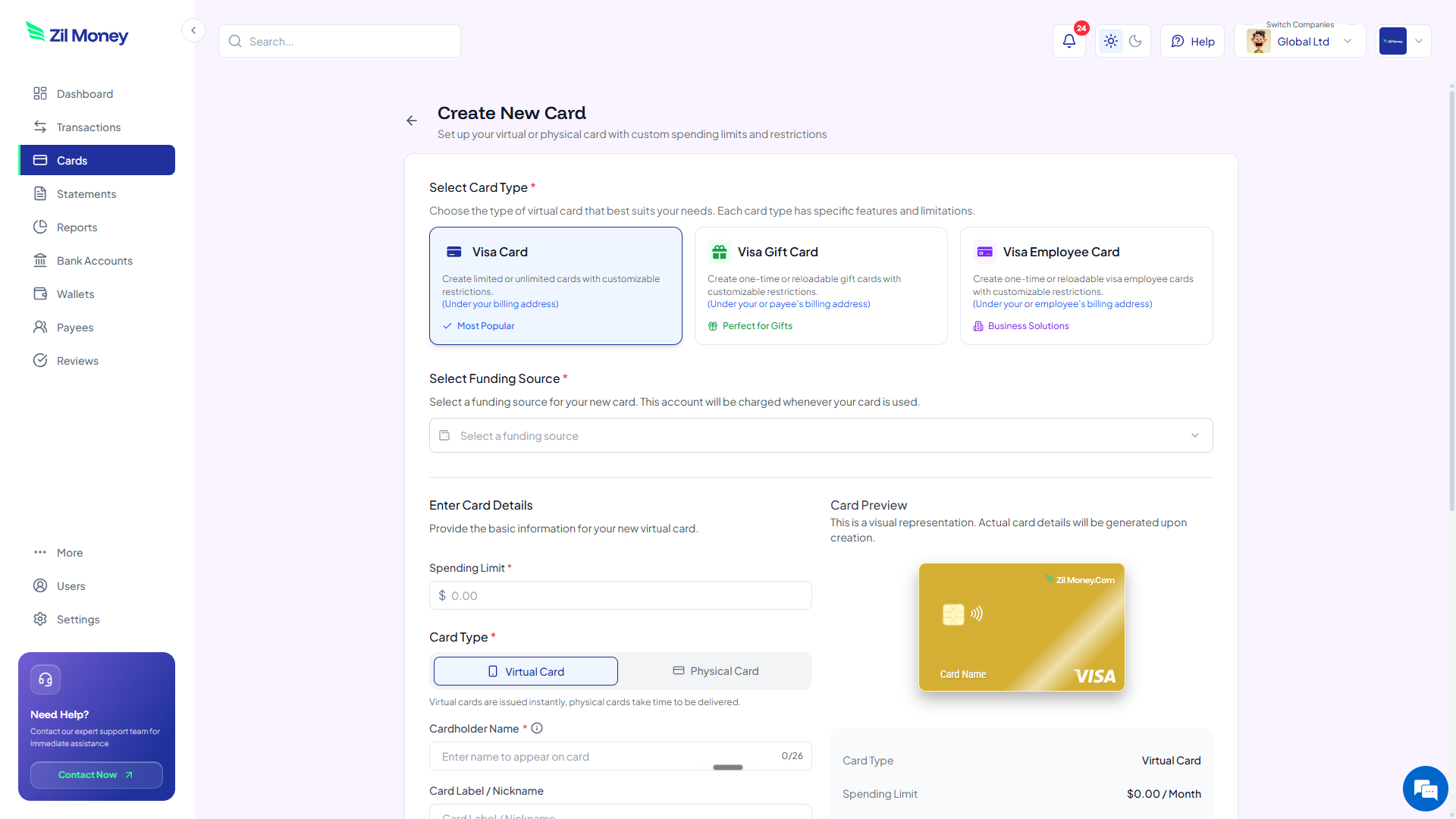
  2. Create a card per project. Set the spending limit to the project budget and label the card with the project name.
  3. Hand it to the owner. Send the card to the person running the project, or push it to their mobile wallet where available.
  4. Track and reconcile. Watch charges post in real time, collect receipts on each one, and export the period for accounting.
See it in action

Every project's spend in one place.

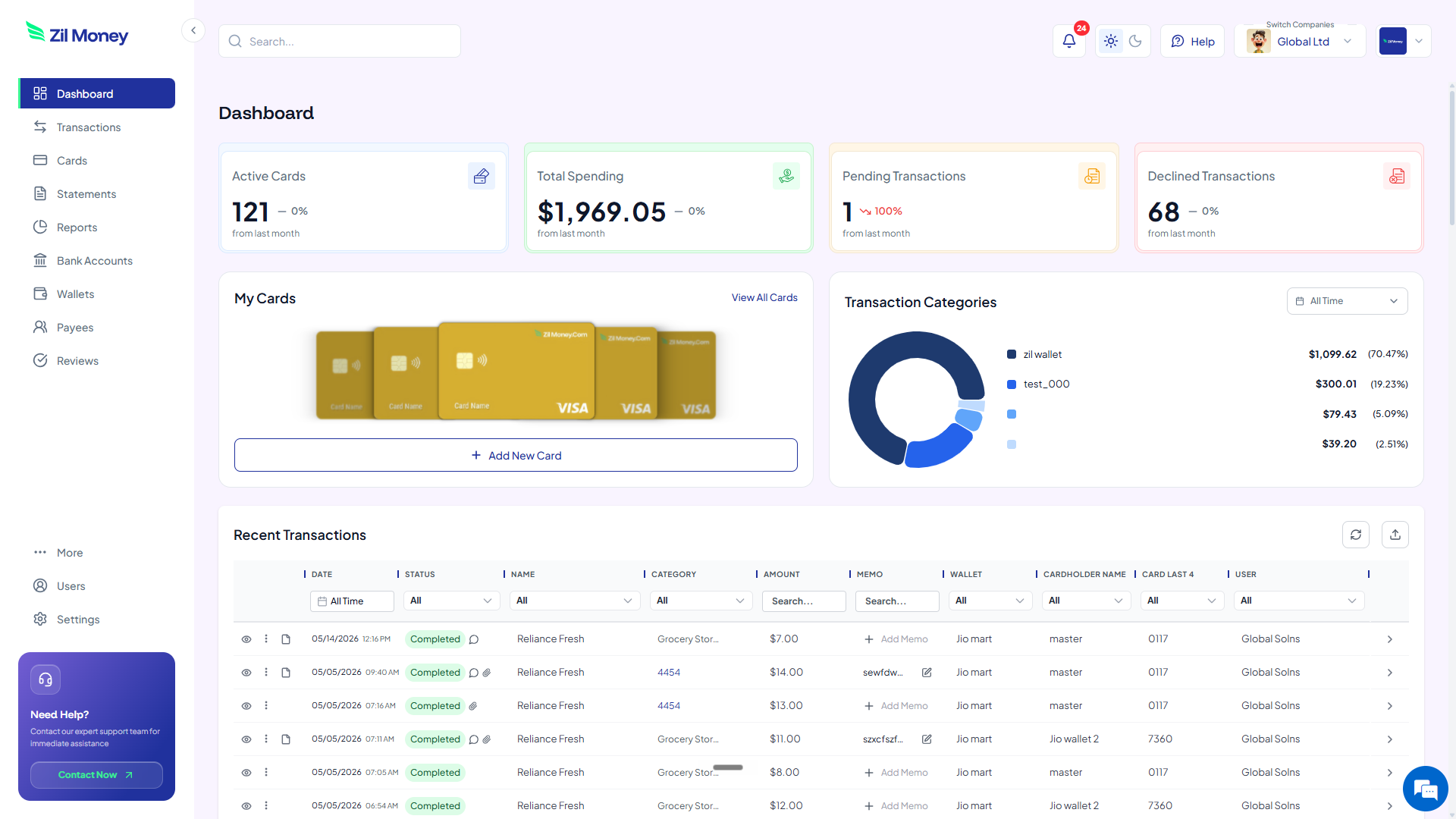
See each card's balance and charges as they post. Issue, top up, or cancel any expense card from the same screen.

Virtual Card Maker dashboard showing per-project expense cards, total spending, and recent transactions
Live dashboard Spend by project, declined attempts, pending charges, and every transaction with its receipt.
Create New Card form in Virtual Card Maker showing a spending limit and a project label for an expense card
Issue an expense card in minutes Set the limit to the project budget, label it, and send it to the project owner.
Controls

What you can set on an expense card.

ControlWhat you setWhy it matters
Spending limitThe project budgetCharges over the budget can be blocked based on your controls.
Limit intervalPer month or per projectRefresh the budget each period or keep it fixed for the project.
Project labelA reporting tagPer-project spend rolls up in your dashboard and exports.
Receipt + reviewerPer transactionEvery charge carries its receipt and an assigned reviewer.
Reload or cancelAnytimeTop up an active card, or cancel it when the project closes.
In practice

Three ways teams use expense cards.

Marketing campaign

Card capped at the campaign budget. Ad and tool charges post against it, and the spend rolls up under one label.

Client trip

A trip card with a daily limit and a time window matching the travel dates. Receipts attach to each charge.

Office supplies

A standing card refreshed monthly. The office manager spends up to the limit without a new approval each time.

Related setups: department budgets, business travel, and employee cards.

FAQ

Common questions.

What is a virtual expense card?+
It is a reloadable virtual Visa card scoped to a project, team, or trip, with its own spending limit. You track every charge and collect receipts against it.
Can I set a different limit for each project?+
Yes. Each card carries its own spending limit, and you can refresh that limit monthly or keep it fixed for the life of the project.
How do employees submit receipts?+
Receipts attach to the transaction in the dashboard. You can also assign a reviewer to each charge so records stay matched.
Can I reload an expense card?+
Yes. Expense cards are reloadable. Top up an active card when the budget grows, or cancel it when the project ends.
What happens when a charge goes over the limit?+
Transactions over the set budget can be blocked based on your controls, and you get a notification in the dashboard.

Put a limit on every project.

Get started online. Create a card per project, set the budget, and stop guessing where the money went.