Issue virtual Visa cards quickly. Sign up →
Use case · Medical & dental practices · Updated June 2026

Virtual cards for medical and dental practices

A virtual card for a medical or dental practice is a prepaid Visa card scoped to one provider, operatory, or location, with a monthly cap and vendor locks. Cap monthly supply and lab spend. Lock a card to medical and dental supply vendors where supported. Freeze or cancel a card in one click. No credit check. Funded from your practice wallet.

Issue quickly Apple & Google Wallet Bulk via Excel or API

Virtual Card Maker - Powered by Zil Money. Zil Money is a financial technology company, not a bank. Banking services are provided by our partner bank, Member FDIC. FDIC insurance applies only to eligible products with funds held at the partner bank, subject to applicable limits and requirements.

PCI DSS aligned
ISO 9001 Quality Management Certified
ISO 20000 IT Service Management Certified
ISO 27001 Information Security Management Certified
Aligned with NIST SP 800-53 controls
AICPA SOC for Service Organizations
AICPA SOC Service Organization Control Reports
A dental practice manager at a front desk holding a gold Zil Money.Com Visa card
The problem

One shared card for the whole practice. No one can tell who spent what.

Virtual cards for medical practices solve this. In most practices the same card pays for everything. The problems pile up fast.

  • No per-provider view. Front desk, hygienists, and providers all buy clinical and office supplies on one number. At month end you cannot tell which provider or which office spent what.
  • Lab and imaging fees blur together. Lab cases, imaging, and equipment charges land on the same statement as everything else. Reconciling them takes hours.
  • Surprise software renewals. Practice-management and EHR subscriptions renew on the shared card. A price increase goes through before anyone notices.
  • You cannot pull the card back. Once staff have the number, you cannot cap it or shut it off without reissuing for the whole practice.
How we fix it

A card per provider, per location, or per category. Each one capped.

Issue a separate virtual Visa card for each provider, each operatory or location, or each spend category. Set the cap. Watch every charge. Shut a card off when you need to.

  • Per provider, location, or category. One card for supplies, one for lab fees, one for a second office. Each has its own limit and its own report.
  • Monthly caps. Set the supply or lab budget as a monthly cap. The spend cap is enforced and the card cannot go over it.
  • Locked to supply vendors. Pick allowed merchant categories so a card works at medical and dental supply vendors. Charges from other categories are declined where the control is supported.
  • Live tracking. See every charge by card as it posts. Reconcile by provider or by office, not from one tangled statement.
  • One-click freeze or cancel. Freeze a card or cancel it in one click. Canceling stops new charges. Pending charges still settle and count against the limit.
  • Works alongside other use cases. The same wallet funds department spending, SaaS subscriptions, and more.
How it works

From one shared card to a capped card per provider, in four steps.

  1. Make a card. Name it for the provider, the location, or the category. Set the monthly cap.
  2. Set the rules. Pick the allowed merchant categories where supported. Pick the start and end dates.
  3. Share the card. The card is emailed to the cardholder, or added to Apple Wallet or Google Wallet.
  4. Track and adjust. Watch every charge in your dashboard. Freeze or cancel a card in one click. Leftover money stays in your wallet.
See it in action

Reconcile by provider and location at month end.

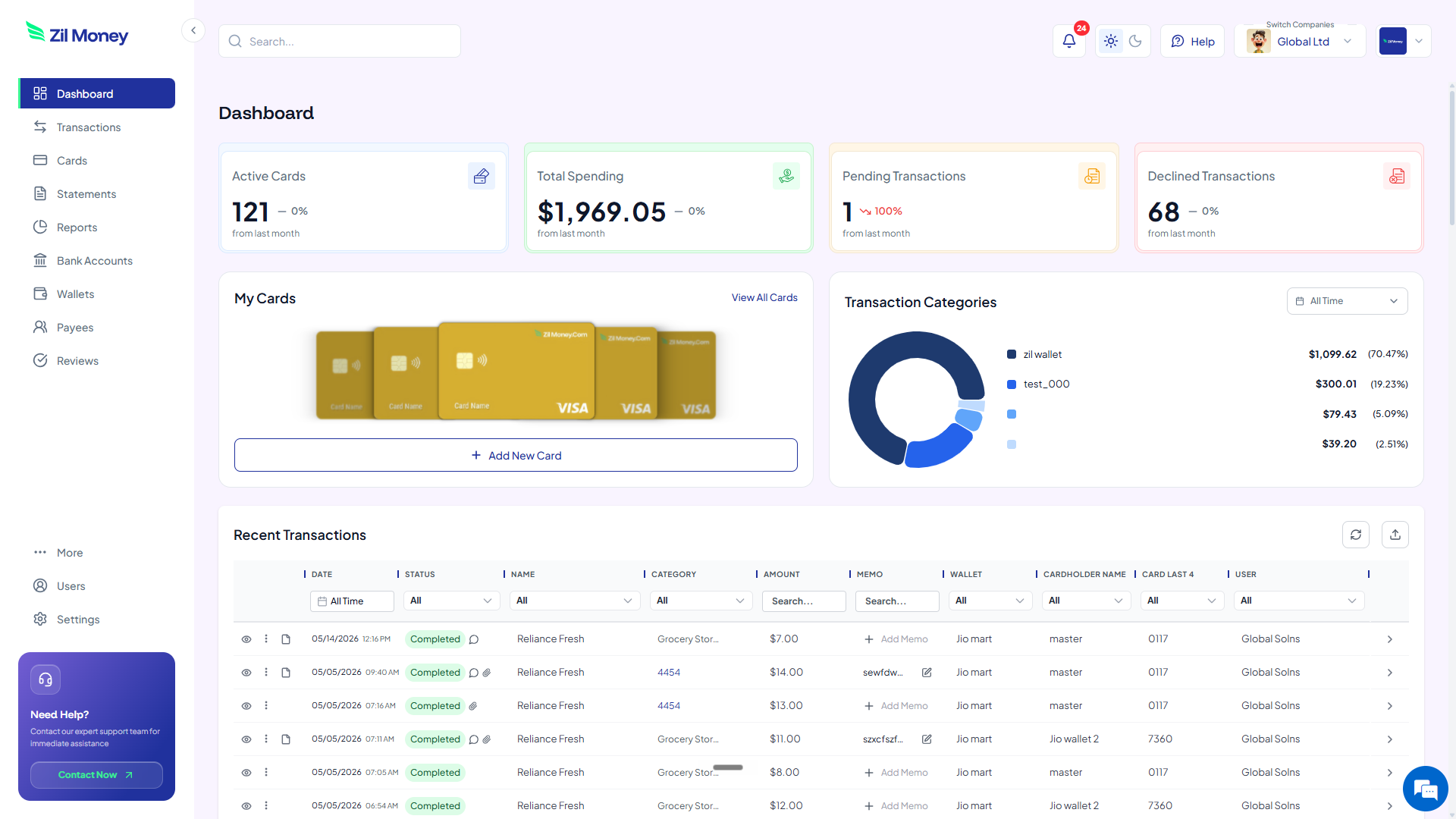
Watch every charge land, by provider and by location, instead of untangling one shared statement. Issue, freeze, top up, or close any card from the same screen, and export the spend per card for your books.

Virtual Card Maker dashboard showing active cards, total spending, pending and declined transactions, and recent activity for virtual cards for medical and dental practices
Live dashboard Active cards, total spend by provider, declined attempts, every charge as it happens.
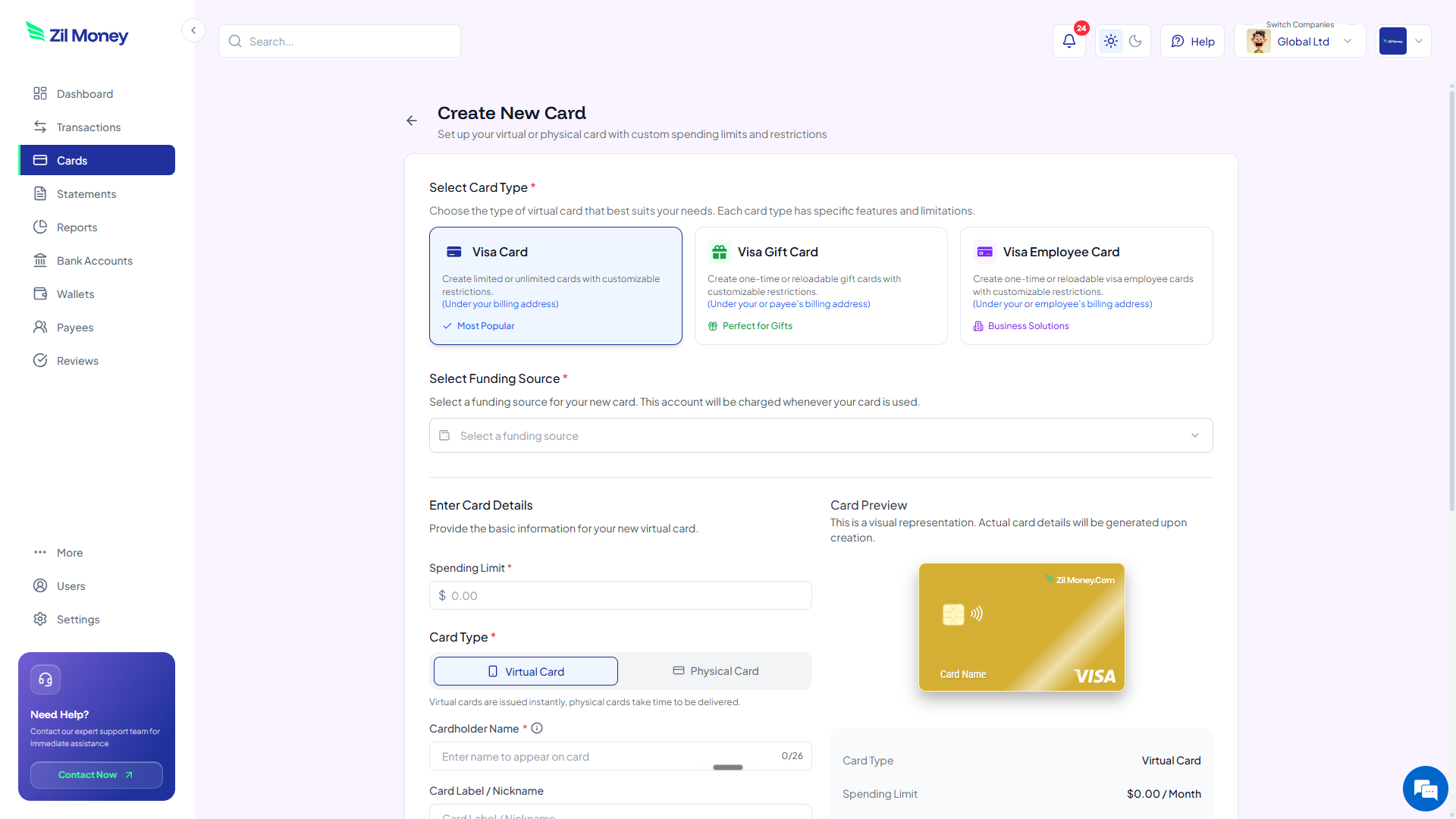
Create New Card form in Virtual Card Maker, with options to pick a Visa card type, set a spending limit, and choose between virtual or physical card
Issue a practice card Pick the card type, set the spending limit, choose virtual or physical, share with the cardholder.
Controls

Set a budget and lock the vendor on every practice card.

ControlWhat you setWhy it matters
Spend limitTotal or monthly capThe card stops at the budget. The card declines charges above the available balance.
Store categoriesAllowed types, where supportedCard works at supply vendors, not anywhere.
Time windowStart and end datesCard ends itself when the period ends.
Cardholder nameProvider, location, or categoryMatches your reconciliation records.
One-time or reusableToggleSingle purchase or recurring spend.
In practice

Three ways practices use virtual cards.

Dental supply reorder / monthly

A card for the monthly dental supply reorder, capped at $3,000. It works at supply vendors where supported. The office manager sees every line by vendor instead of hunting through one statement.

Two-office practice / per location

A 2-office practice issues one card per location, each capped at $4,500 a month. Each office buys its own supplies and lab work. Reconciliation splits cleanly by location at month end.

Recurring practice software

A single card dedicated to the EHR and practice-management subscriptions, capped just above the expected monthly total. If a renewal comes in higher than the cap, the charge is declined and the manager reviews it.

Need cards for other kinds of spend? See supplier payments, accounts payable, or business travel.

FAQ

Common questions.

Where do these cards work?+
Anywhere Visa is accepted. Online supplier portals, in apps, or in person with Apple Wallet or Google Wallet. The cardholder never sees your wallet or bank details.
Can I cap a card for recurring practice software?+
Yes. Set a monthly spend cap on a card dedicated to your EHR or practice-management software. A renewal above the cap is declined, so a price change does not slip through unnoticed.
Can I give each location its own card?+
Yes. Issue a separate card per location or per provider. Each card has its own limit and its own report, so you can reconcile spend by office or by clinician at month end.
What happens if a card goes over its limit?+
The charge is declined. The spend cap is enforced and the card cannot go over it. You see the declined attempt in your dashboard.
Can I issue many cards at once?+
Yes. Upload an Excel sheet with the names and budgets, or use the API. All the cards are created in one batch, which suits multi-provider or multi-location groups.
Does this work with our accounting or practice-management software?+
The cards work anywhere Visa is accepted. Every charge is tracked per card in the dashboard and can be exported and reconciled by provider or by location, so it fits the way you already close the books.
Is any patient information involved?+
No. This is a spend-control tool only. It handles card spend, not patient records, and does not touch PHI.

Take control of practice spending.

Get started online. Verify your business. Add money to your wallet. Make a card per provider, location, or category. Set the cap and share it.

General information, not tax advice. Confirm your accounting and tax treatment with your CPA.