Issue virtual Visa cards quickly. Sign up →
Use case · Law firms · Updated June 2026

Virtual cards for law firms

A virtual card for a law firm is a prepaid Visa card scoped to one matter or attorney, with a set budget and vendor locks. Give each matter its own card. Set the budget. Lock it to the right vendors. Track every cost by matter so you can bill it back to the client. Close the matter, cancel the card. No credit check, and your team never touches the firm bank account.

Issue quickly Apple & Google Wallet Bulk via Excel or API

Virtual Card Maker - Powered by Zil Money. Zil Money is a financial technology company, not a bank. Banking services are provided by our partner bank, Member FDIC. FDIC insurance applies only to eligible products with funds held at the partner bank, subject to applicable limits and requirements.

PCI DSS aligned
ISO 9001 Quality Management Certified
ISO 20000 IT Service Management Certified
ISO 27001 Information Security Management Certified
Aligned with NIST SP 800-53 controls
AICPA SOC for Service Organizations
AICPA SOC Service Organization Control Reports
A law firm office manager at a desk reviewing matter spending with a gold Zil Money.Com Visa card
The problem

Matter costs are hard to control and harder to reconstruct.

Paralegals and associates pay out-of-pocket costs every week. Each one creates a control gap or a billing headache.

  • The shared firm card. A paralegal needs to pay a filing fee, a court fee, a court reporter, a process server, or an expert witness. So they borrow the firm credit card number. Now several people hold it and you cannot take it back.
  • Personal cards and reimbursements. An associate fronts deposition travel on a personal card. Weeks later you are matching receipts to the right matter from memory.
  • No per-matter visibility. At billing time someone reconstructs reimbursable client costs across cards and statements, and costs that should bill to a client quietly slip through.
How we fix it

One card per matter. One budget. One click to close it.

Issue a virtual Visa card for each matter, or for each attorney, funded from your firm's operating wallet. The card holds the budget you set, and every charge stays grouped to that card.

  • Scoped budget. The spend limit is the cost budget you set for the matter. The card cannot go over the limit.
  • Locked to the right vendors. Pick allowed merchant categories. Charges outside them are declined where the control is supported.
  • Per-matter tracking. Every disbursement on a matter card is grouped to that matter, so reimbursable client costs are ready at billing time. See how firms give accountants clean records.
  • One-click cancel at matter close. Close the matter, cancel the card. Cancelling stops new charges. Charges already pending still settle and count against the limit. Unused balance returns to your wallet once pending charges clear.
  • Works across the firm. The same wallet funds department spending and business travel for the firm.
How it works

Four steps from a new matter to tracked spend.

  1. Make a card. Name the card for the matter or the attorney and set the cost budget.
  2. Set the rules. Pick the allowed vendor categories where supported. Set the start and end dates.
  3. Hand it off. The card is emailed to the cardholder or added to Apple Wallet or Google Wallet.
  4. Track and cancel. Watch every disbursement by matter in your dashboard. When the matter closes, cancel the card. Cancelling stops new charges, while pending charges still settle.
See it in action

Every matter's costs in one dashboard.

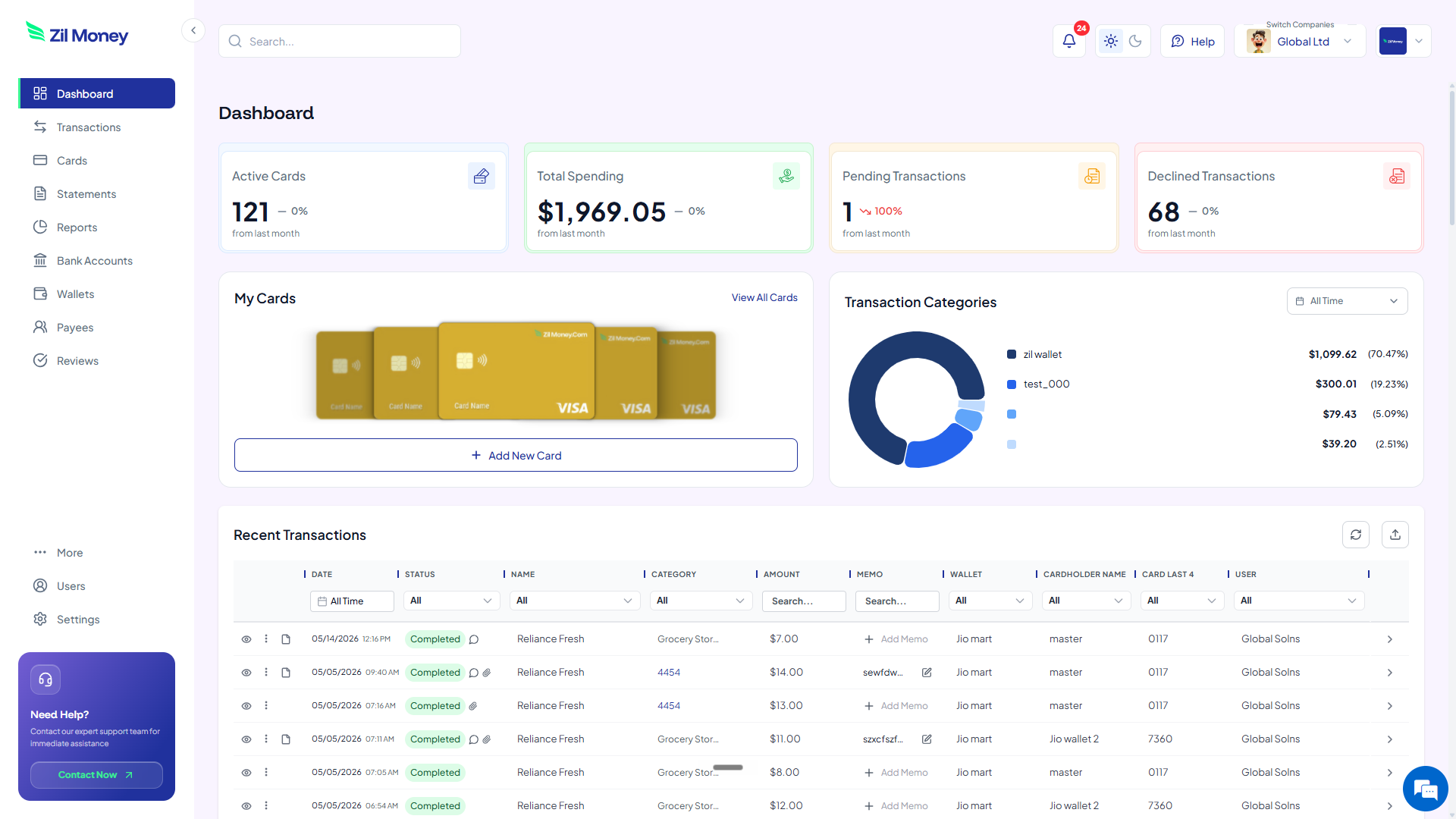
Watch every disbursement land, grouped by matter and by attorney. Issue, freeze, top up, or close any card from the same screen. For broader spend reporting, see virtual expense cards.

Virtual Card Maker dashboard showing active cards, total spending, pending and declined transactions, and recent activity for virtual cards for law firms
Live dashboard Active cards, total spend by matter, declined attempts, every disbursement as it happens.
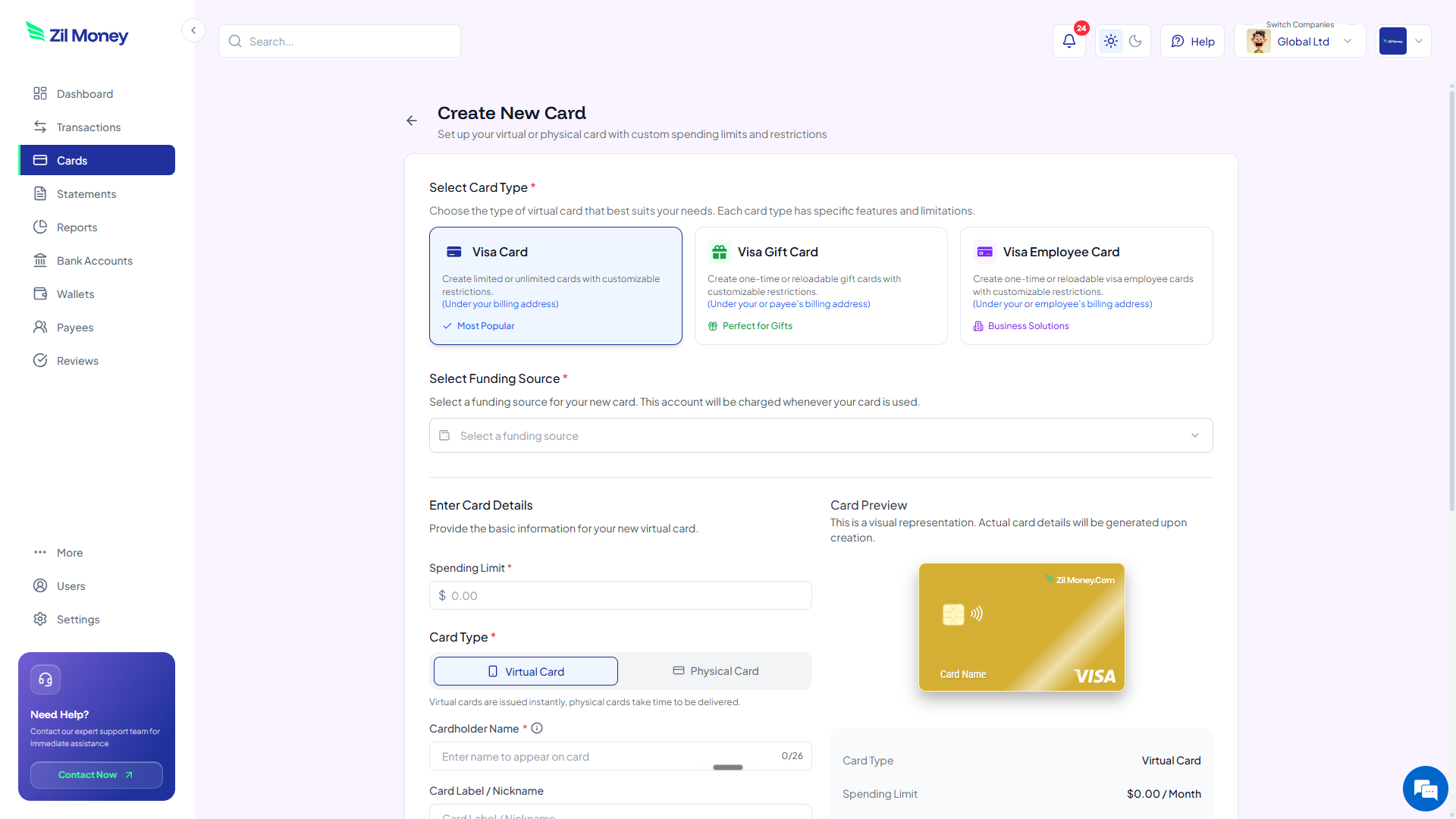
Create New Card form in Virtual Card Maker, with options to pick a Visa card type, set a spending limit, and choose between virtual or physical card
Issue a matter card Pick the card type, set the cost budget, choose virtual or physical, hand it to the attorney or paralegal.
Controls

What you can set on every matter card.

ControlWhat you setWhy it matters
Spend limitTotal or monthly capThe card cannot go over the limit. A matter cannot run past its cost budget.
Store categoriesAllowed types, where supportedCard works at the right vendors based on supported controls.
Time windowStart and end datesCard stops working after the dates you set.
Cardholder nameWhose name appearsMatches the matter or the attorney on file.
One-time or reusableToggleSingle disbursement or ongoing matter costs.
In practice

Three ways firms use virtual cards for matters.

Per-matter card / filing and court fees

Open a $1,200 card for the Henderson matter. The paralegal pays the court e-filing portal and the county recorder fee. Every charge groups to that matter for billing. Unused balance returns at close.

Associate / deposition travel

An associate has a $3,500 card for a two-day deposition. It covers flights, hotel, and the process server. Active for the travel window only, then it stops on its own.

Expert witness / retainer

Pay an expert witness retainer of $7,500 on a dedicated card scoped to that matter. The cost is tracked for client cost recovery, and you cancel the card once the engagement ends.

These cards are funded from your firm's operating wallet for firm-paid costs. They are not a client trust or IOLTA account and should not be used to disburse client trust funds. Tracking costs in cards does not change your reporting obligations. See the IRS Form 1099-NEC instructions. This is general information, not legal or tax advice. Confirm handling of advanced client costs with your firm's accountant. Also see virtual cards for accounts payable.

FAQ

Common questions.

How does a paralegal pay court fees and process servers without the firm card?+
You issue them a matter card that works anywhere Visa is accepted: online, in apps, or in person with Apple Wallet or Google Wallet. So a paralegal pays a court e-filing portal, a process server, a court reporter, or an expert-witness retainer without ever sharing the firm credit card or touching the firm bank account.
What happens to the card when the matter closes?+
Cancel it in one click, which stops new charges. Charges already pending still settle and count against the limit. Any unused balance returns to your firm operating wallet once pending charges clear. You can also cancel mid-matter the same way.
How do I bill these matter costs back to the client?+
Give each matter its own card. Every charge groups to that card, so at billing time you pull one per-matter list of advanced client costs to add to the invoice, with no reconstructing receipts across statements. This is general information, not legal or tax advice. Confirm with your firm's accountant.
Can I use these cards for client trust or IOLTA funds?+
No. The cards are funded from your firm's operating wallet for firm-paid costs only. They are not a client trust or IOLTA account and should not be used to disburse client trust funds. Confirm handling of advanced client costs with your firm's accountant.
What if a paralegal tries to spend more than the matter card holds?+
The charge is declined. The card cannot go over the limit, so a matter cannot quietly run past its cost budget. You see the declined attempt in your dashboard.
Can I set up cards for my whole caseload at once?+
Yes. Upload an Excel sheet with the matter or attorney names and budgets, or use the API. We create all the cards in one batch, so a firm can stand up cards for a full caseload at once.

Track your next matter's costs from day one.

Get started online. Verify your firm. Add money to your operating wallet. Make the matter card. Your paralegal can pay the first court fee without ever touching the firm bank account.