Issue virtual Visa cards quickly. Sign up →
Use case · Franchises · Updated June 2026

Virtual cards for franchises

A virtual card for a franchise is a prepaid Visa card scoped to one location or unit, with a monthly budget and vendor locks. Give every unit manager its own card with a set budget. Lock spend to approved vendors and categories. See all locations in one dashboard. Your managers do not set up accounts; they just receive the card and use it. Freeze or cancel any card in one click. No more off-brand spend you only find out about when the statement lands.

Issue quickly Apple & Google Wallet Bulk via Excel or API

Virtual Card Maker - Powered by Zil Money. Zil Money is a financial technology company, not a bank. Banking services are provided by our partner bank, Member FDIC. FDIC insurance applies only to eligible products with funds held at the partner bank, subject to applicable limits and requirements.

PCI DSS aligned
ISO 9001 Quality Management Certified
ISO 20000 IT Service Management Certified
ISO 27001 Information Security Management Certified
Aligned with NIST SP 800-53 controls
AICPA SOC for Service Organizations
AICPA SOC Service Organization Control Reports
A multi-unit franchise operator reviewing location spending on a laptop while holding a gold Zil Money.Com Visa card
The problem

Spend gets away from you across every location.

Run more than a few units and the same trouble shows up again and again.

  • Every manager needs to buy. Supplies, local marketing, small repairs. Nobody wants to hand out one shared corporate card number to a dozen locations.
  • Maverick and off-brand spend. One unit buys from a vendor you never approved. You find out when the statement lands.
  • No consolidated view. Each location reports its own way. You stitch it together by hand at month-end.
  • New-store openings. A new unit needs a setup budget, but you do not want that card living on after the doors open.
How we fix it

A card per unit. A cap per unit. One dashboard for all of them.

Each location or unit manager gets their own virtual Visa card. Each card holds the budget you set. You watch every unit from one screen.

  • A card per unit or per manager. No shared number. If one card has a problem, the others keep working.
  • A monthly cap per unit. Set a total or a monthly limit. The card cannot go over it.
  • Locked to approved vendors and categories. Pick the allowed merchant categories where supported. Charges from other categories are declined based on supported controls.
  • Consolidated multi-unit dashboard. See spend by location, every charge, and declined attempts in one place.
  • One-click freeze or cancel. Freeze a unit's card or cancel it. Cancelling stops new charges. Charges already pending still settle and count against the limit. Leftover money comes back to your wallet.
  • Bulk-issue every location. Upload one Excel sheet and create cards for all your units at once. See how to control spending across multiple locations.
How it works

Four steps from head office to every unit.

  1. Make the cards. Add each location or manager name and the budget. Do them one at a time, or upload an Excel sheet for all units at once.
  2. Set the rules. Pick the monthly cap per unit. Pick the allowed merchant categories. Pick start and end dates if a card is temporary.
  3. Give out the cards. Each card is emailed to the manager or added to Apple Wallet or Google Wallet. The manager does not set up an account; they just receive the card and use it.
  4. Watch and adjust. See every unit in one dashboard. Freeze or cancel any card in one click. Leftover money comes back to your wallet.
See it in action

Every location in one dashboard.

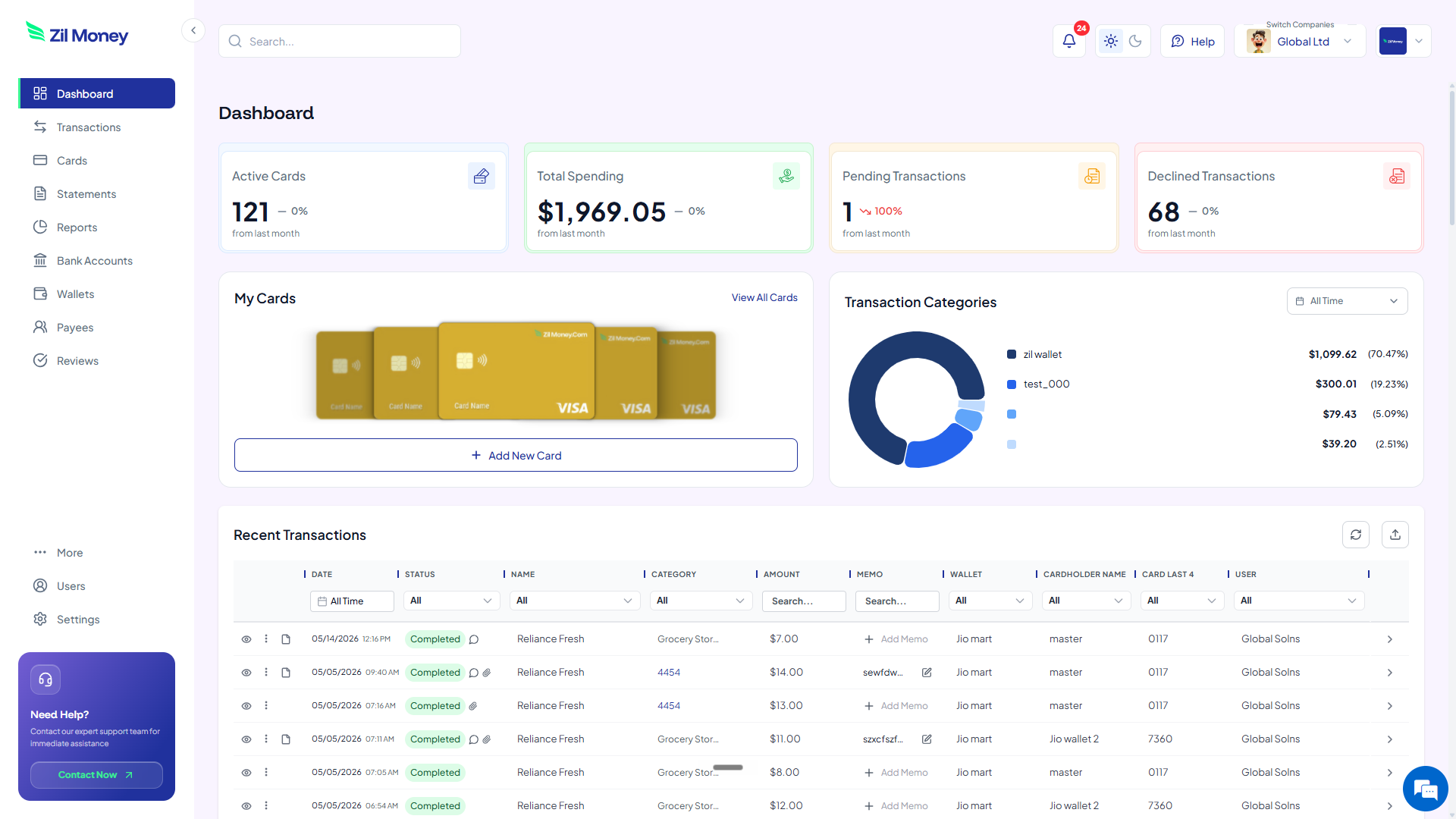
Watch every charge land, by location and by manager. Issue, freeze, top up, or close any card from the same screen.

Virtual Card Maker dashboard showing active cards, total spending, pending and declined transactions, and recent activity for virtual cards for franchises
Live dashboard Active cards, total spend by location, declined attempts, every charge as it happens.
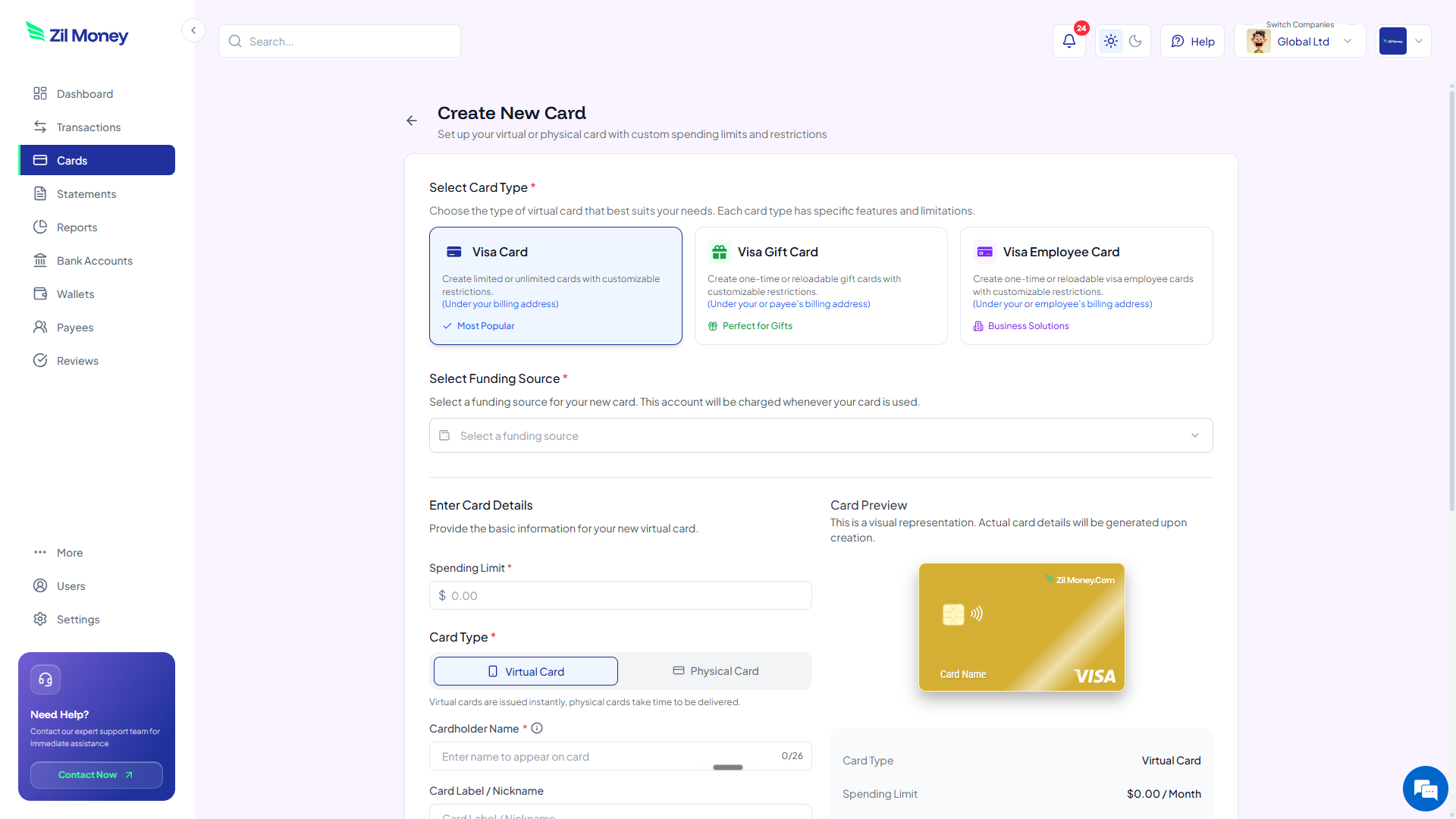
Create New Card form in Virtual Card Maker, with options to pick a Visa card type, set a spending limit, and choose between virtual or physical card
Issue a unit card Pick the card type, set the monthly cap, choose virtual or physical, send it to the location manager.
Controls

What you can set on every unit card.

ControlWhat you setWhy it matters
Spend limitTotal or monthly capThe card stops at the budget. The card declines charges above the available balance.
Store categoriesAllowed types where supportedThe card works at approved kinds of stores. Other categories are declined based on supported controls.
Time windowStart and end dates where supportedA temporary card, like a new-store budget, ends itself on the date you set.
Cardholder nameLocation or manager nameMatches your records for each unit.
One-time or reusableToggleA single purchase or ongoing operating spend.

This is operating-expense control for your units. It is not a royalty or franchise-fee accounting system.

In practice

Three ways franchise operators use virtual cards.

Per-location supply card

Give each store manager a card capped at $1,500 a month for supplies. The card works at restaurant supply and wholesale categories. One unit cannot dip into another unit's budget.

New-store opening budget

Issue a $9,000 setup card for a new location. Add an end date of the grand-opening week. After that date the card does not keep spending. Leftover money comes back to your wallet.

Local co-op marketing card

Hand a unit a $750 monthly card for local ads. Lock it to advertising and marketing categories. Charges outside those categories are declined.

Need cards for other kinds of spend? See department cards, restaurant cards, or business payment cards.

FAQ

What multi-unit operators ask before rolling this out.

Can I issue cards to many locations at once?+
Yes. Upload one Excel sheet with every location name and its budget. We make all the cards in one go. You can also issue cards through the API.
Can I cap each unit on its own?+
Yes. Each card holds its own spend limit, set as a total or a monthly cap. Each card stops at its own limit.
Can I see every location in one place?+
Yes. The dashboard shows all units together. You see spend by location, every charge as it happens, and declined attempts. Freeze or cancel any card from the same screen.
What happens if a unit tries to overspend?+
A charge over the spend limit is declined. The card cannot go over its cap. Charges outside approved categories are declined based on supported controls. You see the declined attempt in your dashboard.
Will the cards work where my locations shop?+
Yes. These are virtual Visa cards. They work anywhere Visa is accepted. Online, in apps, or in stores when added to Apple Wallet or Google Wallet. No bank account is needed at the location.
Do my location managers need their own account?+
No. You issue and control every card centrally from one dashboard. The manager just receives the card by email or in Apple/Google Wallet and uses it; they do not set up an account.

Take control of spend at every unit.

Get started online. Verify your business. Add money to your wallet. Make a card for each location. Watch them all from one dashboard. For one-off business spend, see virtual cards for small business.