Issue virtual Visa cards quickly. Sign up →
Use case · Field service · Updated June 2026

Virtual cards for field service businesses

Run HVAC, plumbing, or electrical and tired of techs fronting cash, sharing one company card, and chasing receipts? A virtual card for a field service business is a prepaid Visa card scoped to one technician or one job, capped for parts and fuel. Give each tech or each job its own card. Cap what they can spend at the supply house. Lock the card to parts and fuel categories. See every charge by tech and by job. Freeze or cancel the card in one click.

No credit check, wallet-funded Apple & Google Wallet Bulk via Excel or API

Virtual Card Maker - Powered by Zil Money. Zil Money is a financial technology company, not a bank. Banking services are provided by our partner bank, Member FDIC. FDIC insurance applies only to eligible products with funds held at the partner bank, subject to applicable limits and requirements.

PCI DSS aligned
ISO 9001 Quality Management Certified
ISO 20000 IT Service Management Certified
ISO 27001 Information Security Management Certified
Aligned with NIST SP 800-53 controls
AICPA SOC for Service Organizations
AICPA SOC Service Organization Control Reports
A field service technician in a work van holding a gold Zil Money.Com Visa card
The problem

Your techs are buying parts and fuel all day. You cannot see any of it.

Service trades run on parts and fuel bought out in the field, and the money side is a mess.

  • One card the whole crew shares. Once everyone has the number, you cannot tell who bought what, and you cannot take it back.
  • Techs front cash and chase receipts. They float their own money at the supply house, then you both spend the week sorting crumpled receipts.
  • No per-tech or per-job visibility. You cannot tell what one technician spent this week, or how much materials spend went into one job.
  • Personal use creeps in. A shared card with no limit and no category lock is an open door.
  • Hard to tie materials to a ticket. Parts bought for three jobs land on one statement, so job costing turns into guesswork.
How we fix it

A card per tech or per job. A cap on each one. One click to shut it off.

Give each technician their own virtual Visa card, or spin up a card for a single job. Each card holds the spend limit you set, and you watch every charge as it lands.

  • A card per technician or per job. Issue one card to a tech for the week, or one card scoped to a single install.
  • Daily, weekly, or per-job caps. The card stops at the cap. A charge over the remaining balance is declined.
  • Locked to parts and fuel. Allow parts-supplier and fuel categories. Other categories are declined based on supported controls.
  • Live per-tech and per-job tracking. See materials spend by technician and by job as each charge happens.
  • One-click freeze or cancel. Shut a card off when a tech is done for the week or a job closes. Leftover money comes back to your wallet.
  • Bulk-issue the whole crew. Upload one Excel sheet and issue every technician a card in one go. Same wallet also funds fleet expenses and department spending.
How it works

Four steps to get a capped card in a tech's hands.

  1. Make a card. Add the technician name or the job name and the spend limit.
  2. Set the rules. Pick a daily, weekly, or per-job cap. Allow parts and fuel categories. Set start and end dates.
  3. Get the card to the tech. The card is emailed to the technician or added to Apple Wallet or Google Wallet to tap at the supply house.
  4. Track and shut off. Watch every charge by tech and by job in your dashboard. When the week ends or the job closes, freeze or cancel the card. Cancelling stops new charges. Charges already pending still settle and count against the cap. Leftover money comes back to you.
See it in action

See what every tech bought and what hit each job.

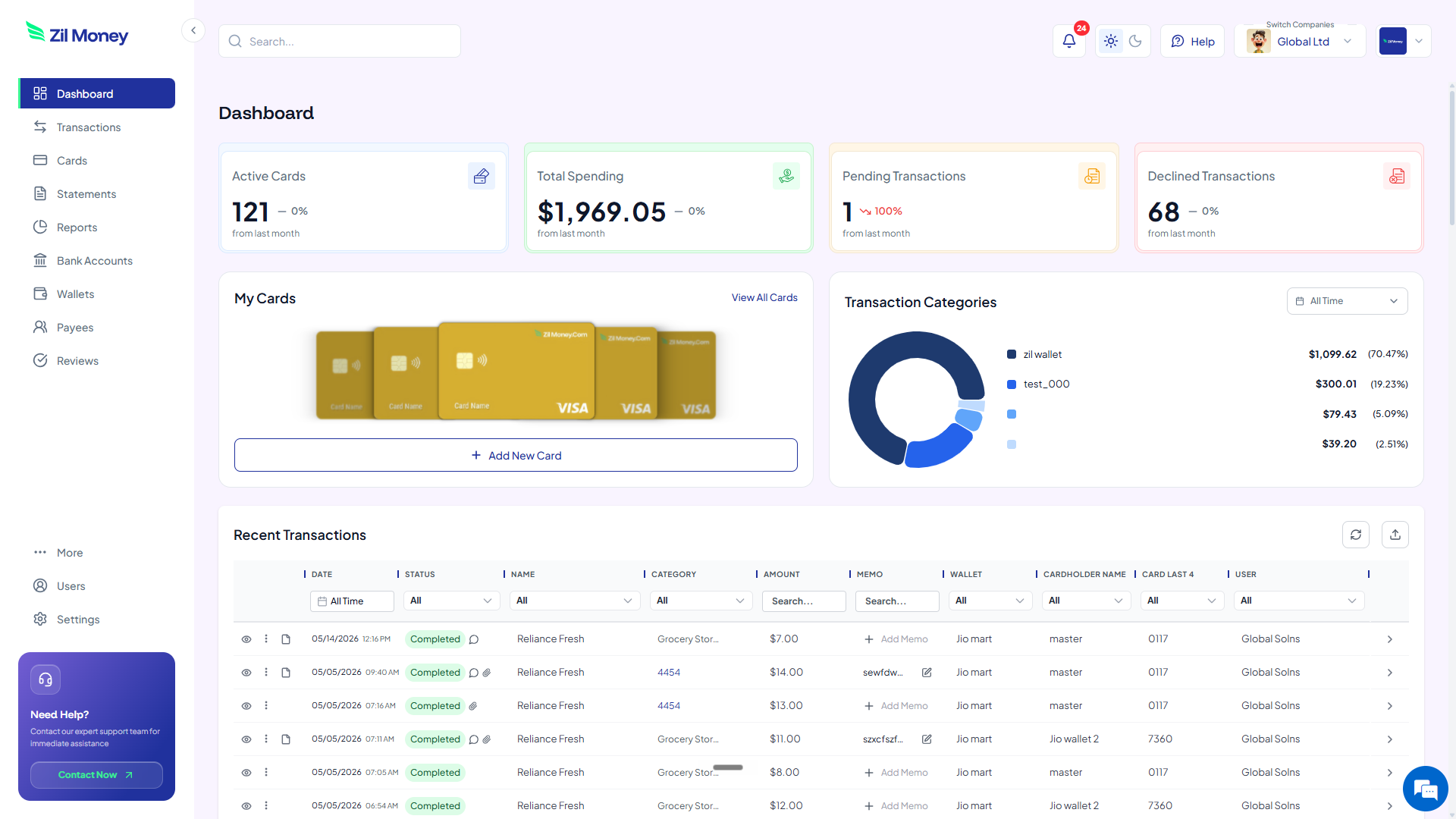
Watch every charge land, by technician and by job. Issue, freeze, top up, or close any card from the same screen. No more chasing receipts at the end of the week.

Virtual Card Maker dashboard showing active cards, total spending, pending and declined transactions, and recent activity for virtual cards for field service businesses
Live dashboard Active cards, materials spend by technician and by job, declined attempts, every charge as it happens.
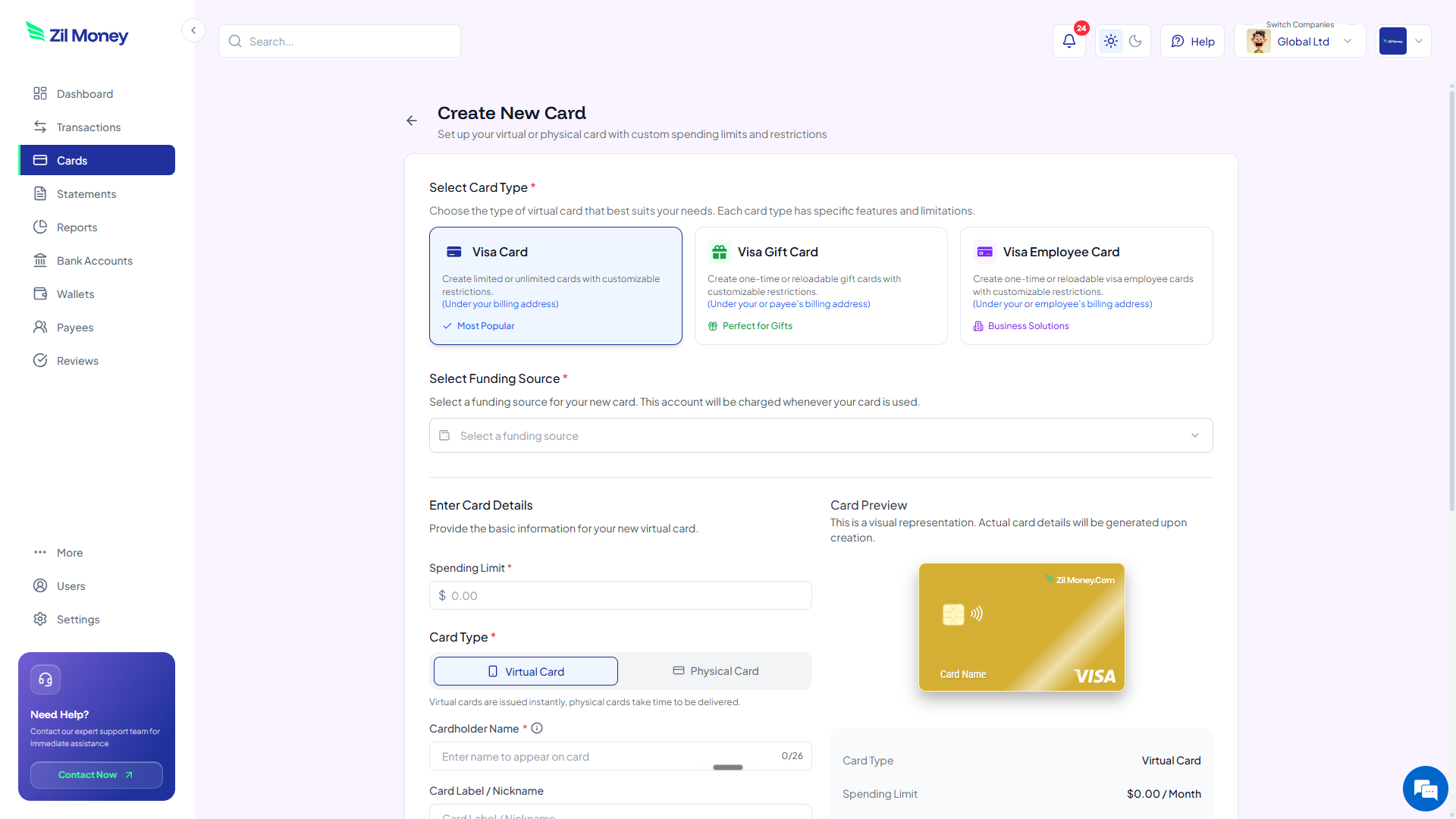
Create New Card form in Virtual Card Maker, with options to pick a Visa card type, set a spending limit, and choose between virtual or physical card
Issue a technician card Pick the card type, set the spend limit, choose virtual or physical, get it to the tech.
Controls

What you can set on every technician or job card.

ControlWhat you setWhy it matters
Spend limitDaily, weekly, or total capThe card stops at the cap. A charge over the remaining balance is declined.
Store categoriesAllowed types, where supportedCard works at parts suppliers and fuel based on supported controls.
Time windowStart and end dates, where supportedCard matches the work week or the length of the job.
Cardholder nameTechnician or job nameCharges roll up as materials spend by tech and by job.
One-time or reusableToggleOne install or an ongoing route of service calls.

Building or remodeling instead of servicing? See virtual cards for construction.

In practice

Three ways service companies use virtual cards.

Plumbing tech / weekly

Give a plumbing technician a card capped at $750 a week for parts at supply houses, locked to parts and fuel. Every charge rolls up as that tech's materials spend.

HVAC install / one job

Spin up a per-job card for a big AC install with a $4,000 cap and an end date. Materials spend on that job stays on one card. Cancel the card when the install closes.

Electrical crew / fuel only

Issue a fuel-only card locked to the gas and fuel category, capped at $300 a week. The crew uses it for fuel, and other categories are declined where supported.

Need other kinds of spend control? See fleet expenses, contractor payments, or expense cards.

FAQ

Common questions.

Will the card work at my parts supply houses?+
Yes. The virtual Visa card works anywhere Visa is accepted, including supply houses, hardware stores, and fuel stations. Technicians can pay online or add the card to Apple Wallet or Google Wallet to tap in store.
Can technicians use the card in person at the supply house?+
Yes. Add the card to Apple Wallet or Google Wallet to tap at the counter, or use the card number online or by phone. It works anywhere Visa is accepted.
Can I cap what a technician spends per day or per week?+
Yes. Set a daily, weekly, or total cap on each card. The card stops at the cap. A charge over the remaining balance is declined, and you see the declined attempt in your dashboard.
Can I tie materials spend to a specific job?+
Yes. Issue a card per job and give it the job name. Every charge on that card rolls up as materials spend for that job, so you can see the materials spend on one ticket without sorting through one shared card.
What happens if a technician tries to overspend?+
The charge is declined. The card cannot go over the cap. Category and merchant declines are based on supported controls. You see every declined attempt in your dashboard.
Can I issue cards to the whole crew at once?+
Yes. Upload an Excel sheet with every technician name and spend limit, or use the API. We make all the cards in one go, so the whole crew is covered without one-by-one setup.

Put a controlled card in every tech's hands.

Get started online. Verify your business. Add money to your wallet. Make the cards. Your technicians can pay at the supply house without fronting cash or chasing receipts.