Issue virtual Visa cards quickly. Sign up →
Use case · Contractor payments

Virtual cards for contractors

Pay your contractors with a virtual Visa card. Set a budget. Pick the stores the card works at. Cancel the card when the job is done. They never see your bank account.

Issue quickly Apple & Google Wallet Bulk via Excel or API

VirtualCardMaker powered by Zil Money. Zil Money is a financial technology company, not a bank. Banking services are provided by our partner bank, Member FDIC. FDIC insurance applies only to eligible products with funds held at the partner bank, subject to applicable limits and requirements.

PCI DSS Certified
ISO 9001 Quality Management Certified
ISO 20000 IT Service Management Certified
ISO 27001 Information Security Management Certified
CCPA California Consumer Privacy Act
NIST SP 800-53A Revision 5
HIPAA Compliant
Card Name
The problem

Three ways to pay a contractor today. All three are messy.

Most teams pay contractors one of three ways. Each one has a real problem.

  • ACH transfer. You need their bank info. It takes 1 to 3 days. If the scope changes, the money is already gone.
  • Paper check. No tracking. The mail can lose it. You do not know when it hits the bank.
  • Shared corporate card. Once they have the number, you can not take it back.
How we fix it

One card. One budget. One click to end it.

Each contractor gets their own virtual Visa card. The card holds the exact budget you agreed to. When the work is done, you cancel the card.

  • No bank account needed. Contractors do not share routing numbers. They use the card like any Visa card.
  • Locked to the budget. The spend limit is the price you agreed to. The card can not go over.
  • Locked to the right stores. Pick the store types. The card only works there. Other charges are declined.
  • One-click cancel. Job done? Cancel the card. The leftover money comes back to your wallet.
  • Works alongside other use cases. Same wallet funds business travel, department spending, and more.
How it works

Four steps from agreement to paid contractor.

  1. Make a card. Add the contractor's name and the budget.
  2. Set the rules. Pick the stores. Pick the start and end dates.
  3. Send the card. By secure email, Apple Wallet, or Google Wallet.
  4. Track and cancel. Watch every charge in your dashboard. When the work is done, cancel the card. Leftover money comes back to you.
See it in action

Your contractor payments in one dashboard.

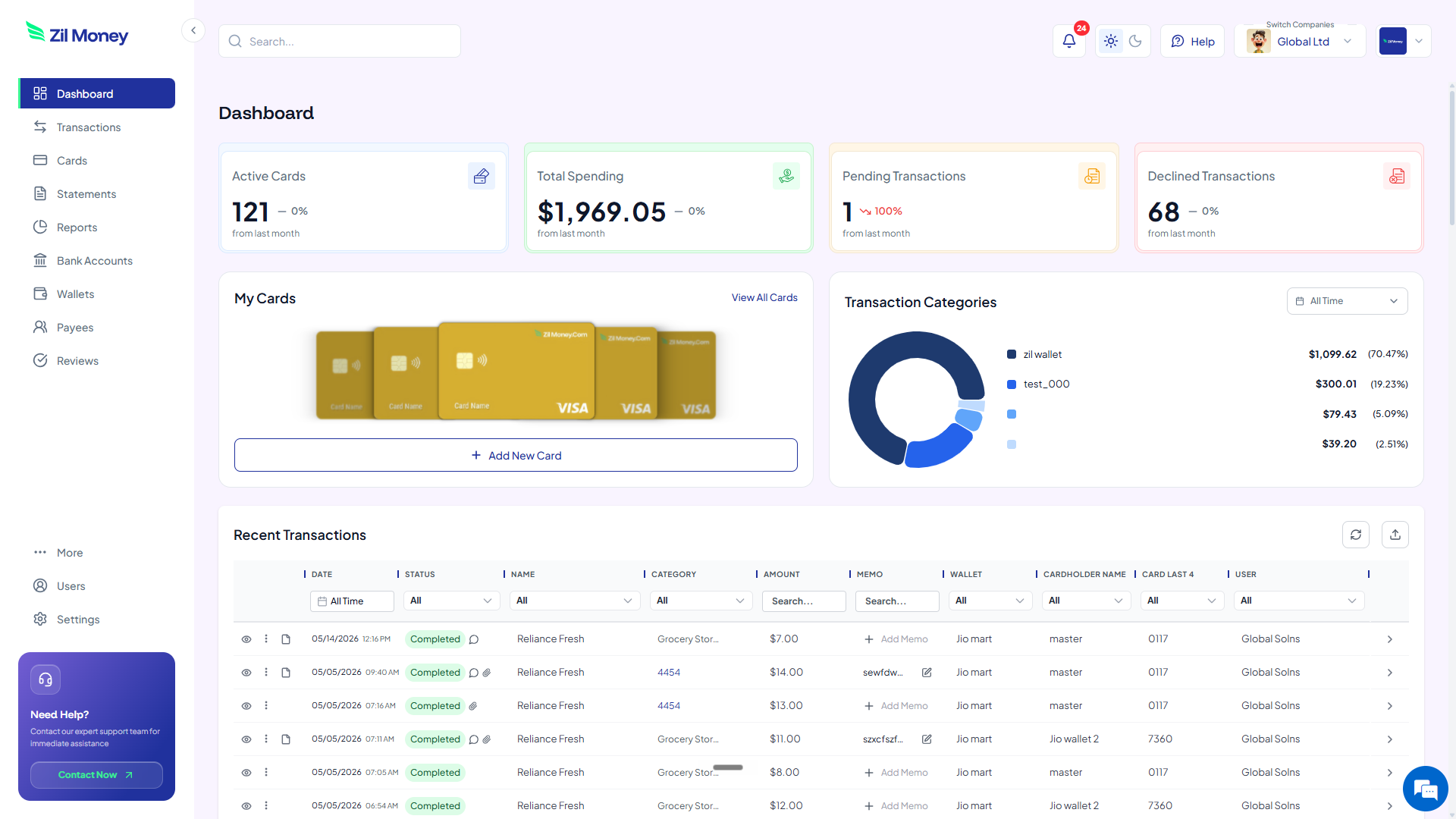
Watch every charge land, by contractor and by project. Issue, freeze, top up, or close any card from the same screen.

Virtual Card Maker dashboard showing active cards, total spending, pending and declined transactions, and recent activity for virtual cards for contractors
Live dashboard Active cards, total spend by contractor, declined attempts, every charge as it happens.
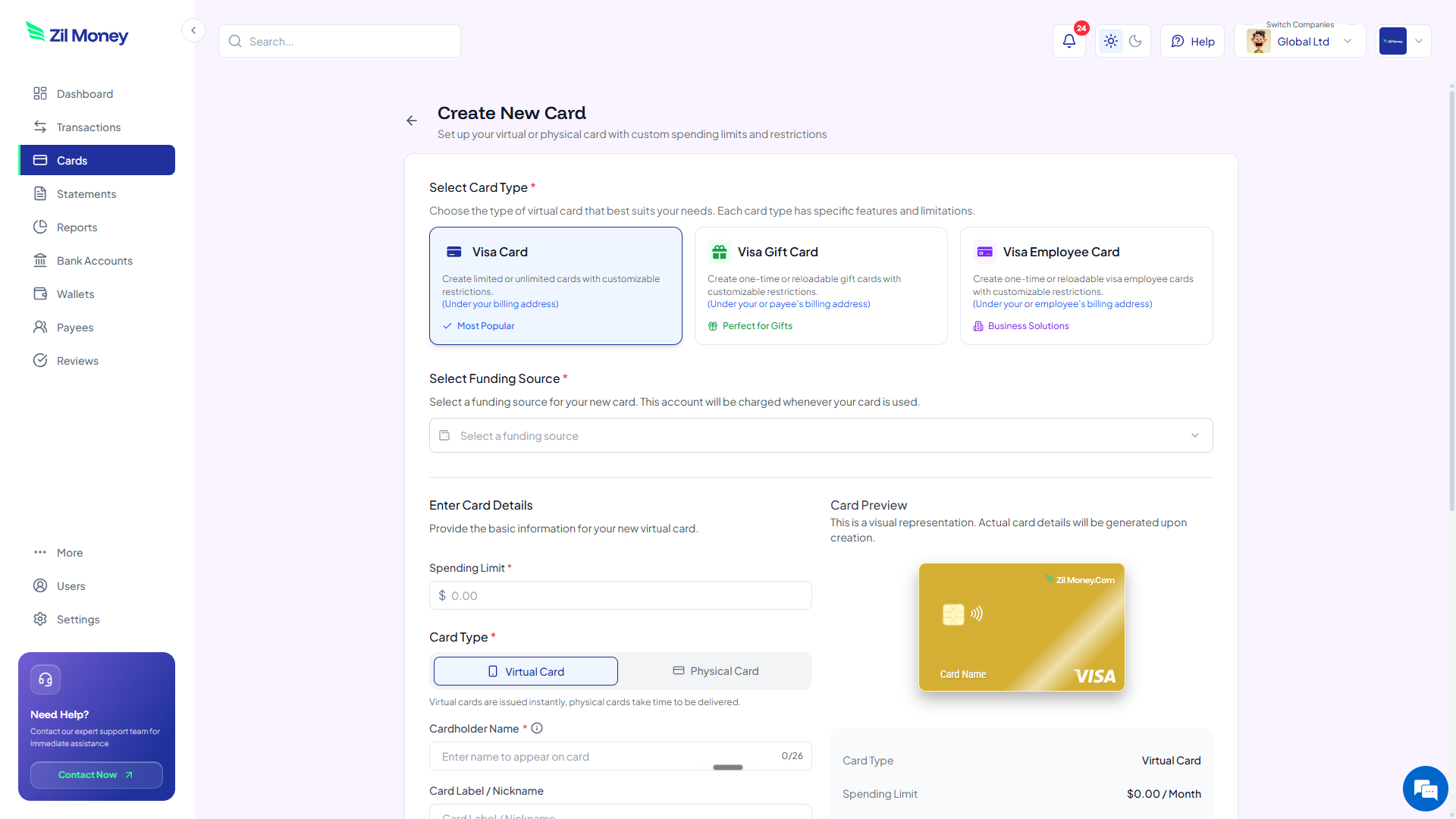
Create New Card form in Virtual Card Maker, with options to pick a Visa card type, set a spending limit, and choose between virtual or physical card
Issue a contractor card in minutes Pick the card type, set the spending limit, choose virtual or physical, send to the contractor.
Controls

What you can set on every contractor card.

ControlWhat you setWhy it matters
Spend limitTotal or monthly capThe card stops at the budget. No overage possible.
Store categoriesAllowed typesCard only works at the right kinds of stores.
Time windowStart and end datesCard ends itself when the project ends.
Cardholder nameWhose name appearsMatches your contractor records.
One-time or reusableToggleSingle payment or ongoing work.
In practice

Three ways teams pay contractors with virtual cards.

Graphic designer / 30 days

Pay a designer $2,400 over 30 days. The card works at Adobe, Figma, and her hosting. Nothing else. Ends April 1. Leftover $182 comes back.

Contractor team / launch

Issue 12 cards in one Excel upload. Each card has its own budget. Each card works only at the stores you picked.

Q1 tax accountant

Pay your CPA $5,000 for tax season. Card works at professional service stores only. Active Jan 15 to May 15. Cancel after.

Need cards for other kinds of spend? See SaaS subscriptions, business travel, or payroll cards.

FAQ

Common questions.

Do contractors need a bank account?+
No. Virtual Visa cards work anywhere Visa is accepted. Online, in apps, or in stores with Apple Wallet or Google Wallet. The contractor does not share any bank info.
Can I cancel a card in the middle of a job?+
Yes. One click. The card stops working right away. Any leftover money comes back to your wallet.
Does this change my 1099 tax forms?+
No. The IRS still wants you to file a 1099 for any contractor you pay $600 or more a year. We give you a per-card report so you have the exact numbers.
What if the contractor tries to spend more than the card holds?+
The charge is declined. The card can not go over. You see the declined try in your dashboard.
Can I make many cards at once?+
Yes. Upload an Excel sheet with all the contractor names and budgets. We make all the cards in one go.

Pay your next contractor faster.

Get started online. Verify your business. Add money to your wallet. Make the card. Your contractor has the card before the kickoff call.