Issue virtual Visa cards quickly. Sign up →
Card type · Payroll card

Payroll cards for employees

Pay employees and contractors on a reloadable Visa card. Load wages each pay cycle with no bank account required from the recipient, then reload the same card next time.

Issue quickly Apple & Google Wallet Bulk via Excel or API

Virtual Card Maker - Powered by Zil Money. Zil Money is a financial technology company, not a bank. Banking services are provided by our partner bank, Member FDIC. FDIC insurance applies only to eligible products with funds held at the partner bank, subject to applicable limits and requirements.

PCI DSS aligned
ISO 9001 Quality Management Certified
ISO 20000 IT Service Management Certified
ISO 27001 Information Security Management Certified
Aligned with NIST SP 800-53 controls
The problem

Not everyone you pay has a bank account.

Paper checks get lost and direct deposit needs a bank account the worker may not have.

  • Unbanked workers wait. A worker without a bank account cannot take direct deposit and waits on a paper check to clear.
  • Collecting bank details is slow. Chasing routing and account numbers from a large group delays every pay run.
  • Checks cost time and money. Printing, mailing, and reissuing lost checks adds work to every cycle.
How we fix it

Pay them on a reloadable card instead.

A payroll card is a reloadable Visa card you fund each pay cycle. The worker spends from it wherever Visa is accepted.

  • No recipient bank account. The worker does not need a bank account to be paid. They receive a card they can use right away.
  • Reload each cycle. Keep an active card across pay cycles, with funds loaded each pay period.
  • Pay a group at once. Issue cards to a group from one upload, instead of collecting bank details one by one.
  • Spend anywhere Visa works. Workers use the card wherever Visa is accepted, in store or online, and add it to a mobile wallet where available.
How it works

How to pay workers on a payroll card.

  1. Fund the wallet. Add the payroll amount to your wallet by ACH or wire.
  2. Issue the cards. Create a card for each worker, or issue to a group from one upload.
  3. Load wages. Set each card's amount for the pay period. The worker can spend as soon as the card is funded.
  4. Reload next cycle. At the next pay run, load the same cards again. No new card needed.
See it in action

Every worker's pay, on one screen.

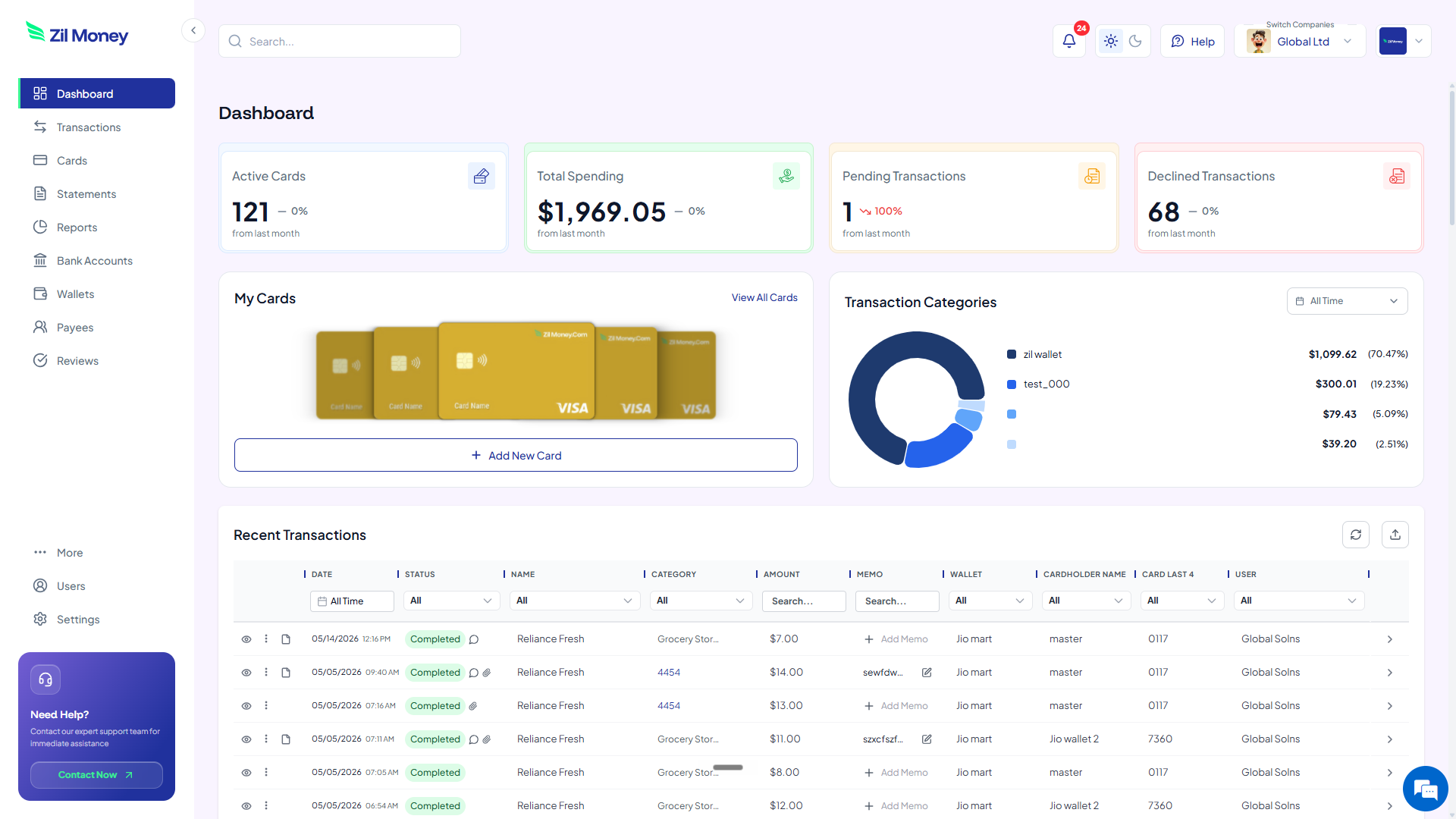
See each card's balance and spend. Load, reload, or cancel any card from the same dashboard.

Virtual Card Maker dashboard showing payroll cards, balances, and recent transactions for a team
Live dashboard Each worker's card balance, recent spend, and a full transaction log per card.
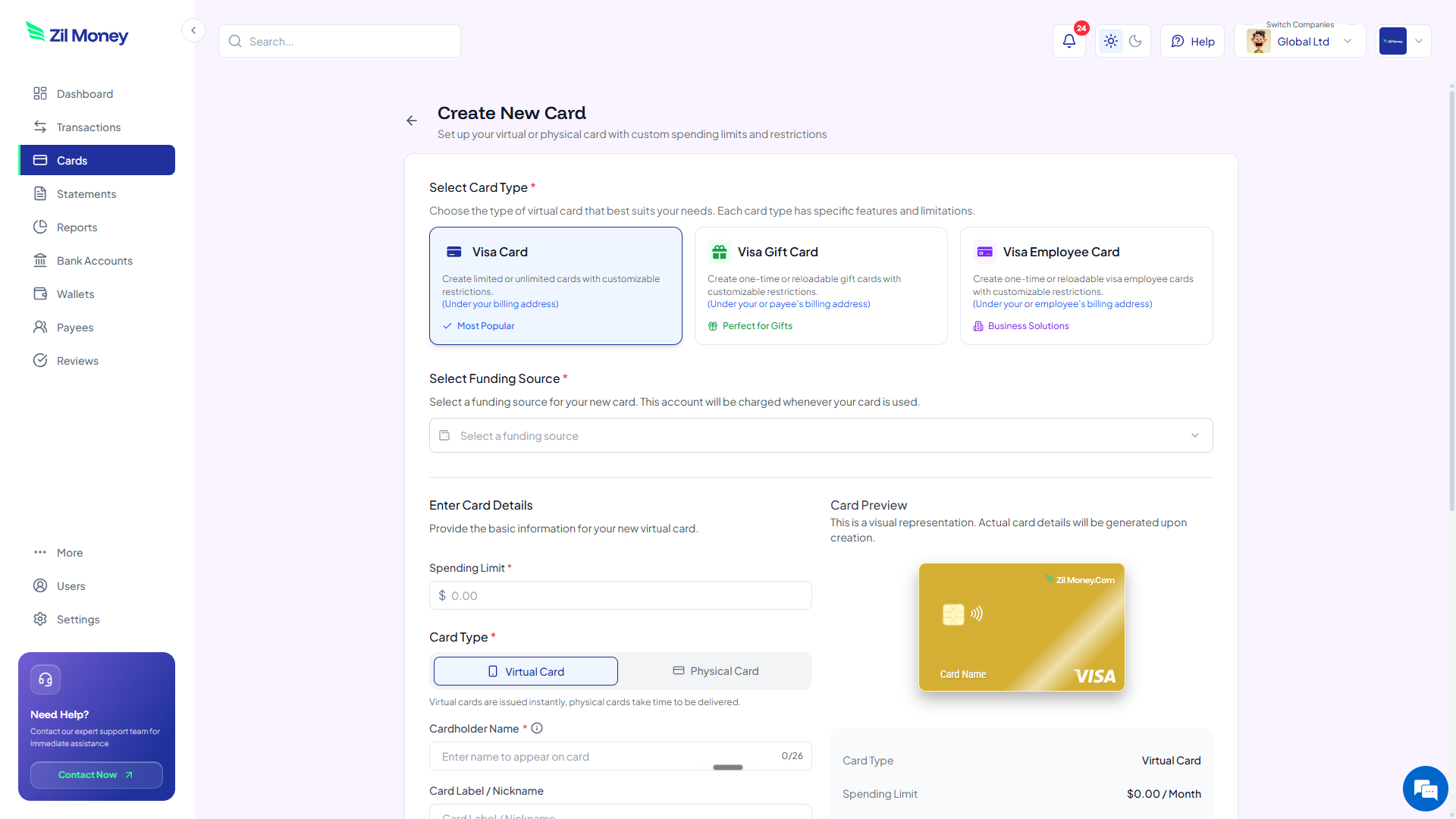
Create New Card form in Virtual Card Maker showing a reloadable card and amount for a payroll card
Issue payroll cards in minutes Create reloadable cards, load the pay-period amount, and send each worker their card.
Controls

What you can set on a payroll card.

ControlWhat you setWhy it matters
Load amountPer pay periodSet each worker's wages for the cycle.
ReloadableAcross cyclesKeep an active card and load funds again each pay period.
Cardholder nameUp to 26 charactersThe worker's name on the card.
Virtual or physicalCard formatIssue a virtual card right away, or ship a physical card by USPS.
CancelAnytimeCancel a card when a worker stops being paid.
In practice

Three ways businesses use payroll cards.

Day labor

After a worker chooses the card as their payment method, load the day's pay onto it. They spend it the same way as cash.

Seasonal crew

Issue reloadable cards to a seasonal team and load wages each week, without collecting bank details from everyone.

Contractor pay

Pay a contractor without a bank account on a card, and reload it for the next milestone.

Related: bulk payroll and reimbursements and how to pay staff without a bank account.

FAQ

Common questions.

What is a payroll card?+
It is a reloadable Visa card you fund each pay cycle to pay an employee or contractor. The worker spends from it wherever Visa is accepted and does not need their own bank account.
Does the employee need a bank account?+
No. A bank account is not required from the recipient. They receive a card and can use it as soon as it is funded.
Can I reload the same card each pay period?+
Yes. The card is reloadable. You keep an active card across pay cycles and load funds again each pay period.
Is using a payroll card mandatory for workers?+
No. Wage-payment is voluntary on the worker's side. Workers should be offered the card as a choice, consistent with Regulation E and state wage-payment laws, and never required to take it.
Can I pay a whole team at once?+
Yes. Issue cards to a group from one upload and load each card's amount for the pay period, instead of collecting bank details one by one.

Pay everyone, bank account or not.

Get started online. Issue reloadable cards, load wages each cycle, and pay workers without chasing bank details.