Issue virtual Visa cards quickly. Sign up →
Card type · Employee card

Employee virtual cards

Issue each employee a Visa card in their own name. Set role-based spending limits, route larger charges through manager review, and see every transaction in one dashboard.

Issue quickly Apple & Google Wallet Bulk via Excel or API

Virtual Card Maker - Powered by Zil Money. Zil Money is a financial technology company, not a bank. Banking services are provided by our partner bank, Member FDIC. FDIC insurance applies only to eligible products with funds held at the partner bank, subject to applicable limits and requirements.

PCI DSS aligned
ISO 9001 Quality Management Certified
ISO 20000 IT Service Management Certified
ISO 27001 Information Security Management Certified
Aligned with NIST SP 800-53 controls
The problem

Sharing one company card with the whole team.

A single shared card means no individual accountability and no way to scope what each person can spend.

  • No name on the spend. Charges are not tied to a person. Tracing who bought what is a month-end chore.
  • One limit for everyone. A new hire and a director share the same ceiling, or there is no ceiling at all.
  • Offboarding is messy. When someone leaves, you cancel the shared card and disrupt everyone else.
How we fix it

Each employee gets a card in their own name.

An employee card is a Visa card issued to a named person, with a limit that matches their role.

  • Named cards. Each card carries the employee's name, up to 26 characters, so every charge maps to a person.
  • Role-based limits. Give a director a higher limit than a new hire. Set the cap that fits the role.
  • Manager review. Route charges through a review workflow, with a reviewer assigned and an audit log on each one.
  • Clean offboarding. When an employee leaves, cancel just their card. Everyone else keeps spending.
How it works

How to give an employee a spending card.

  1. Add the employee as a payee. Enter their name and an email or phone number so they can receive the card.
  2. Create an employee card. Set the spending limit for their role and choose virtual or physical.
  3. Send the card. The employee receives a secure link by email with instructions to access and use the card.
  4. Review and report. Assign reviewers, collect receipts, and export spend by employee for accounting.
See it in action

Every employee's spend, by name.

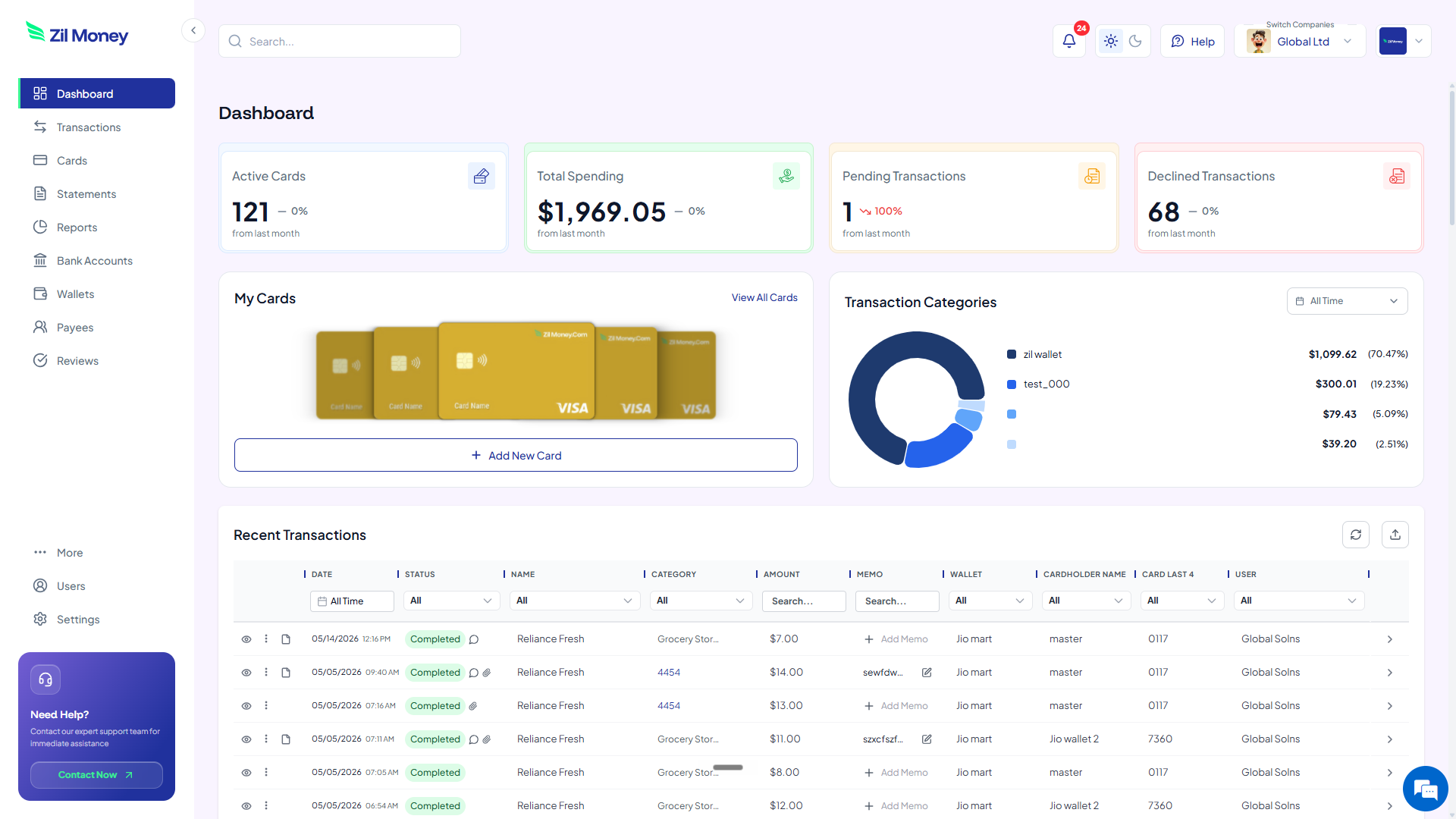
See each person's card, limit, and charges as they post. Issue, review, or cancel any card from the same screen.

Virtual Card Maker dashboard showing employee cards by name, spending limits, and recent transactions
Live dashboard Spend by employee, pending and declined charges, assigned reviewers, and a full audit log.
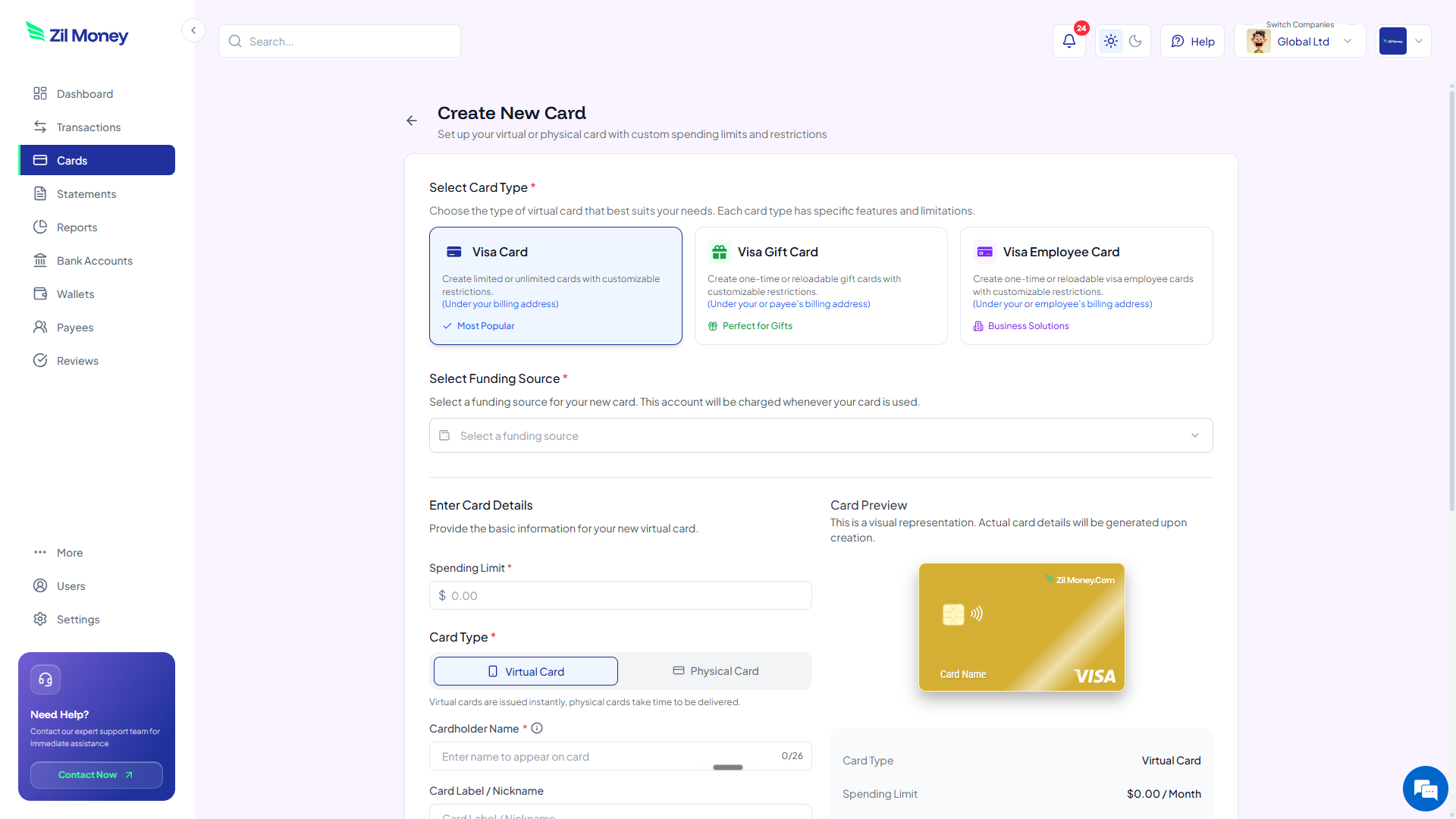
Create New Card form in Virtual Card Maker showing a cardholder name and spending limit for an employee card
Issue an employee card in minutes Pick the employee, set the role limit, and send a secure link by email.
Controls

What you can set on an employee card.

ControlWhat you setWhy it matters
Cardholder nameUp to 26 charactersEvery charge maps to a named person.
Spending limitBy roleA director and a new hire can carry different ceilings.
ReviewerPer transactionLarger charges route through a manager with an audit log.
Merchant or time limitsOptionalScope the card to the categories or window the role needs.
CancelOn offboardingCancel one employee's card without touching anyone else's.
In practice

Three ways teams use employee cards.

New hire

A starter card with a modest limit. As the employee takes on more, raise the cap from the dashboard.

Field team

Each technician carries a named card scoped to fuel and supplies, with receipts attached to every charge.

Manager approval

Charges above a threshold route to the manager for review before they are marked approved.

Related setups: remote employee cards, department budgets, and expense cards.

FAQ

Common questions.

What is an employee virtual card?+
It is a Visa card issued to a named employee for business spending. Each card carries its own limit and ties every charge to that person.
Can I print the employee's name on the card?+
Yes. The cardholder name is printed on the card face, up to 26 characters.
Can a manager approve transactions?+
Yes. You can assign a reviewer to transactions and route charges through a review workflow, with an audit log on each one.
Can I set different limits for different roles?+
Yes. Each card carries its own spending limit, so a director and a new hire can have different ceilings.
What happens when an employee leaves?+
Cancel that employee's card from the dashboard. Future charges on it stop clearing, and no one else's card is affected.

Give every employee their own card.

Get started online. Issue named cards with role-based limits and keep every charge tied to a person.