

Virtual gift cards for employees
Skip the Amazon-only restriction. Issue bulk virtual Visa gift cards to your team in one Excel upload. Recipients spend them anywhere Visa is accepted.











Three ways to thank your team. All three have problems.
You want to reward your people. The usual options are weak.
- Amazon gift cards. One retailer. No flexibility. Reads as the easy choice.
- Cash bonus. Gets lost in payroll. No gift framing. Often feels like a smaller paycheck.
- Physical gift cards in bulk. Ordering, addressing, mailing, lost in the post. The moment passes before the cards arrive.
One spreadsheet. Bulk virtual gift cards delivered today.
Build a recipient sheet with names, emails, and amounts. Upload. We issue a virtual Visa gift card to each recipient and email them the card. They spend it at any Visa merchant.
- Bulk via Excel. Upload a sheet with 5 recipients or 5,000. Each row becomes a gift card. One upload, one funding step.
- Open-loop Visa. Recipients spend it anywhere Visa is accepted. Not locked to one retailer.
- Branded delivery email. Recipients get an email with your company name on it, not a generic gift-card vendor's.
- Physical option for big moments. Physical gift card options are available for eligible programs.
- Works alongside other use cases. Same wallet funds contractor payments and department spending.
Four steps from spreadsheet to spent gift card.
- 01
Build the recipient sheet.
Columns: name, email, amount, optional message. One row per recipient.
- 02
Upload and fund.
The dashboard validates the sheet, totals the funding, and pulls from your wallet.
- 03
Recipients receive the cards.
Branded email with the virtual gift card details. They can add the card to Apple Wallet or Google Wallet.
- 04
Track redemption.
See which cards are redeemed and which have not been touched. Resend the delivery email to recipients who have not accessed their card.
Your gift card program in one dashboard.
Watch redemption land, by recipient and by batch. Issue, freeze, or close any card from the same screen.
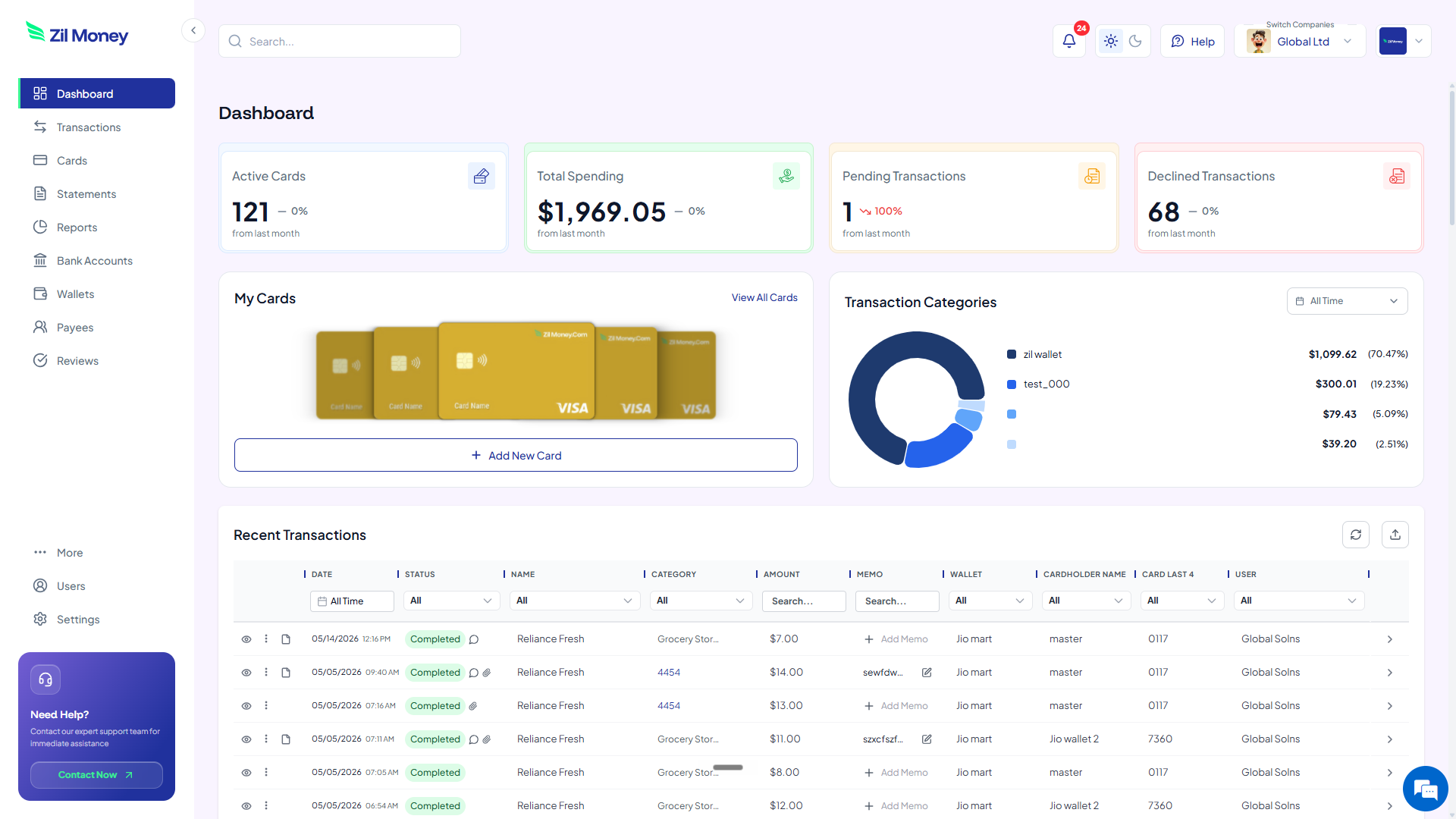
Live dashboard
Active gift cards, total program spend, declined attempts, every redemption as it happens.
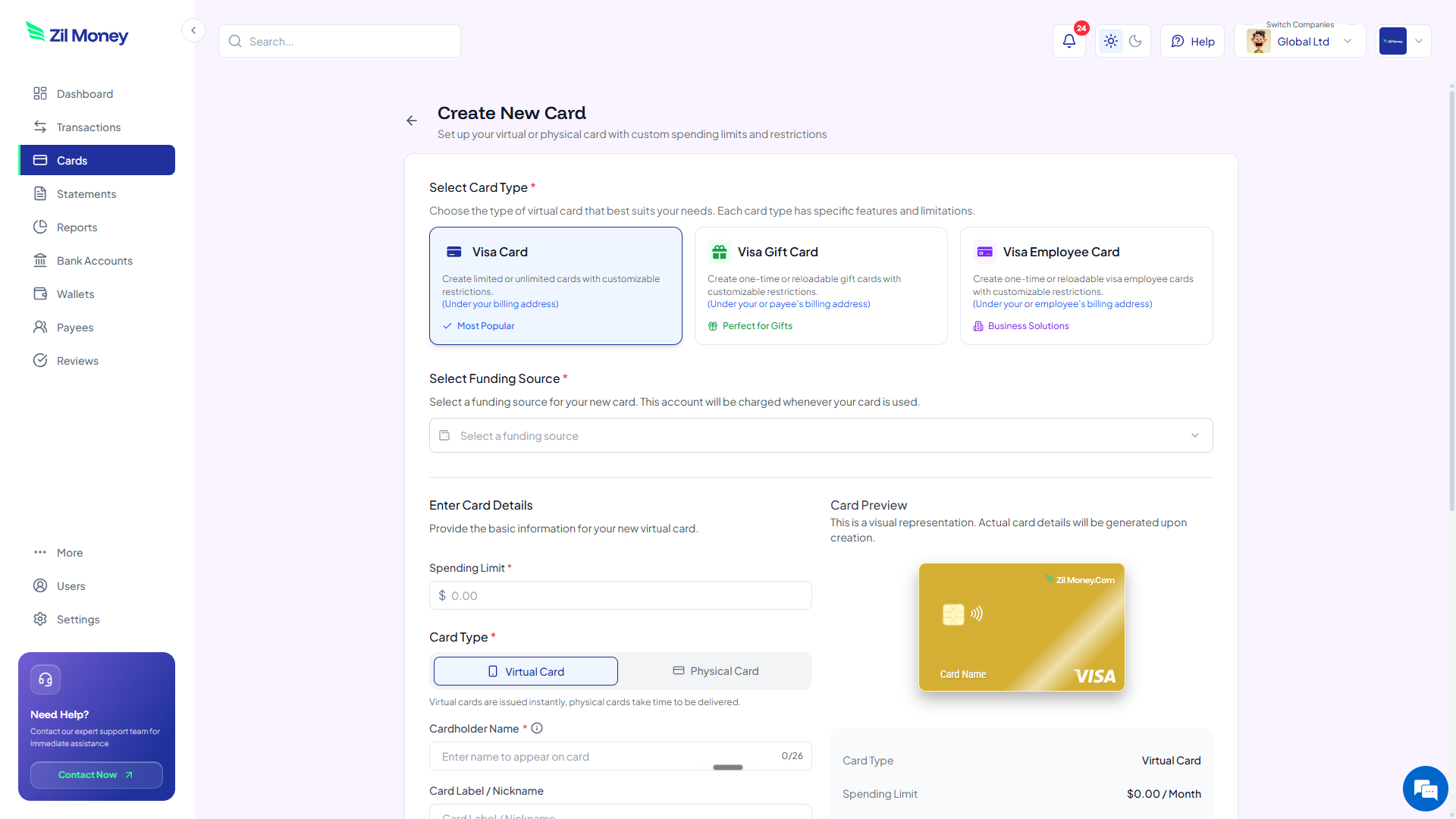
Issue gift cards in minutes
Pick the Visa Gift Card type, set the amount per recipient, choose virtual or physical, send the batch.
What you can set on every batch of gift cards.
ControlWhat you setWhy it matters
Per-recipient amount
Set per rowDifferent amounts per role, tier, or moment.
Delivery channel
Email or physicalMatch the moment. Quick win or milestone.
Custom message
Per recipient or batch-widePersonal touch on a programmatic process.
Expiry
Set within applicable state-law limitsSet within applicable consumer protection rules.
Reporting tag
Campaign name or batch IDPer-batch redemption stats for HR or Finance.
Three ways teams use virtual gift cards.
- 200-person holiday bonus
People Ops uploads a sheet of 200 employees, each getting a $100 holiday gift card. Delivered Dec 15 with a branded message from the CEO. The per-recipient transaction record exports for payroll reporting.
- Employee of the month
$250 virtual card with a custom note. Pushed to Apple Wallet within an hour of the announcement. Recipient buys whatever they want.
- Conference attendee thank-you
Marketing sends $50 cards to 1,200 webinar attendees the day after the event. Branded as a thanks-for-joining-us follow-up.
Need cards for other kinds of spend? See contractor payments, business travel, or department budgets.
Common questions.
Where can recipients spend the gift card?
Anywhere Visa is accepted. Online and in stores. Virtual Visa gift cards are open-loop, unlike single-retailer gift cards.
How is this taxed for the recipient?
Gift cards given to employees by an employer are generally taxable income according to the IRS (Publication 15-B), regardless of amount. Talk to your tax or payroll provider for the right treatment. We provide a per-recipient transaction record to support payroll reporting.
Can recipients add the card to Apple Wallet or Google Wallet?
Yes. Recipients can push the virtual gift card to Apple Wallet or Google Wallet and tap to pay at any contactless terminal.
What if a recipient never redeems the card?
Gift card expiration and inactivity fees are regulated by state law and Visa network rules. Unredeemed balances stay on the card until used or the card expires. Funds for unissued cards remain in your wallet.
Can I send physical gift cards too?
Yes. Choose between virtual delivery via email or physical Visa gift cards shipped to any U.S. address.
Related setups.
- Use cases
Virtual cards for accounts payable automation.
Pay suppliers with a capped virtual Visa per invoice or per vendor. Retire manual checks, hold spend to what was approved, and keep every payment labeled by the card you issued.
4 min read - Use cases
Virtual cards for influencer and affiliate payouts.
Pay each creator and affiliate with a virtual Visa loaded for the exact fee. Send the details, close the card when it is used, and keep every payout as its own campaign line.
3 min read - Use cases
Virtual cards for international online shopping
When you buy from a site you have never used before, a virtual card limits what that merchant can do. Cap it, restrict it, and cancel it if anything looks off.
3 min read
Issue the first one this afternoon.
Virtual gift cards for employees take about a minute each: pick the type, set the limit, add the restrictions, send it.